> ## Documentation Index
> Fetch the complete documentation index at: https://docs.pangolin.net/llms.txt
> Use this file to discover all available pages before exploring further.
# System Architecture
> Learn how the components of the system interact to form Pangolin
Fastest way to get started with Pangolin using the hosted control plane. No credit card required.
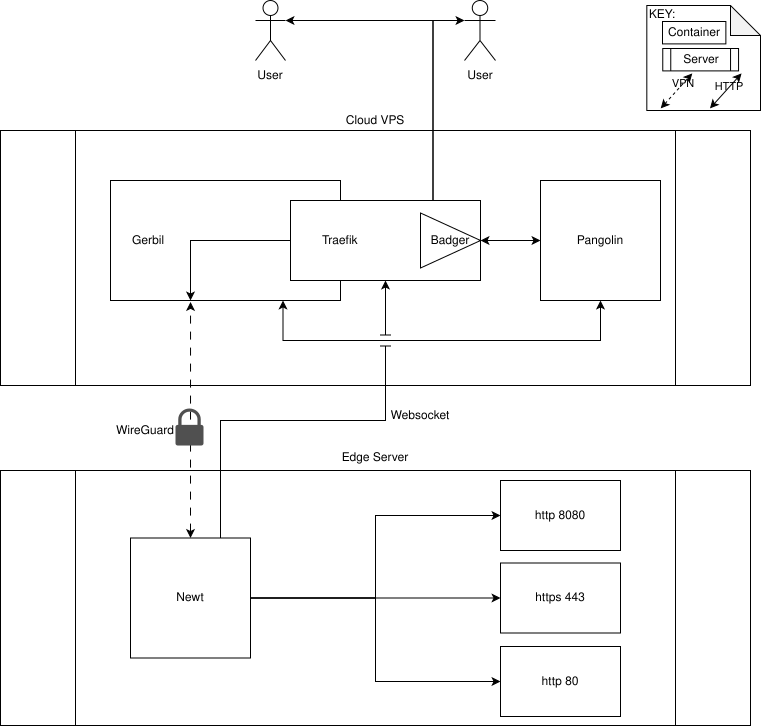
### Pangolin (Control Plane)
Pangolin is the main control center that orchestrates the entire system:
* **Web Interface**: Management dashboard for configuring sites, users, and access policies
* **REST API**: External API for automation and integration
* **WebSocket Server**: Manages real-time connections to edge network clients
* **Authentication System**: Handles user authentication and authorization
* **Database**: Stores configuration, user data, and system state
Pangolin acts as the brain of the system, coordinating all other components and managing user access.
### Gerbil (Tunnel Manager)
Gerbil manages the secure WireGuard tunnels between your edge networks and the central server:
* **Peer Management**: Creates and maintains WireGuard connections
* **Tunnel Orchestration**: Handles tunnel creation, updates, and cleanup
* **Security**: Ensures all traffic is encrypted using WireGuard's cryptographic protocols
WireGuard provides fast, secure, and reliable tunneling with minimal overhead.
### Newt (Edge Client)
Newt is a lightweight client that runs on your edge networks (servers, VMs, or containers):
* **Automatic Discovery**: Finds the optimal node for best performance
* **Dual Connection**: Connects to Pangolin via WebSocket and Gerbil via WireGuard
* **Resource Proxy**: Creates TCP/UDP proxies to expose your applications securely
Newt is designed to be resource-efficient and can run on minimal hardware or in containers.
### Reverse Proxy (Router)
The reverse proxy handles incoming requests and routes them to your applications:
* **Request Routing**: Directs traffic to the correct backend services
* **SSL Termination**: Manages HTTPS certificates and encryption
* **Middleware Support**: Integrates with security and monitoring plugins
### Badger (Authentication Middleware)
Badger is Pangolin's middleware that enforces access control:
* **Request Interception**: Catches all incoming requests before they reach your applications
* **Authentication Check**: Verifies user identity and permissions
* **Secure Redirects**: Sends unauthenticated users to Pangolin's login system
Badger ensures that only authenticated and authorized users can access your applications, even if they bypass other security measures.