# AI Usage Analytics (/manage/ai/usage-analytics)
> Cost, token usage, and request volume across providers, resources, roles, users, and keys
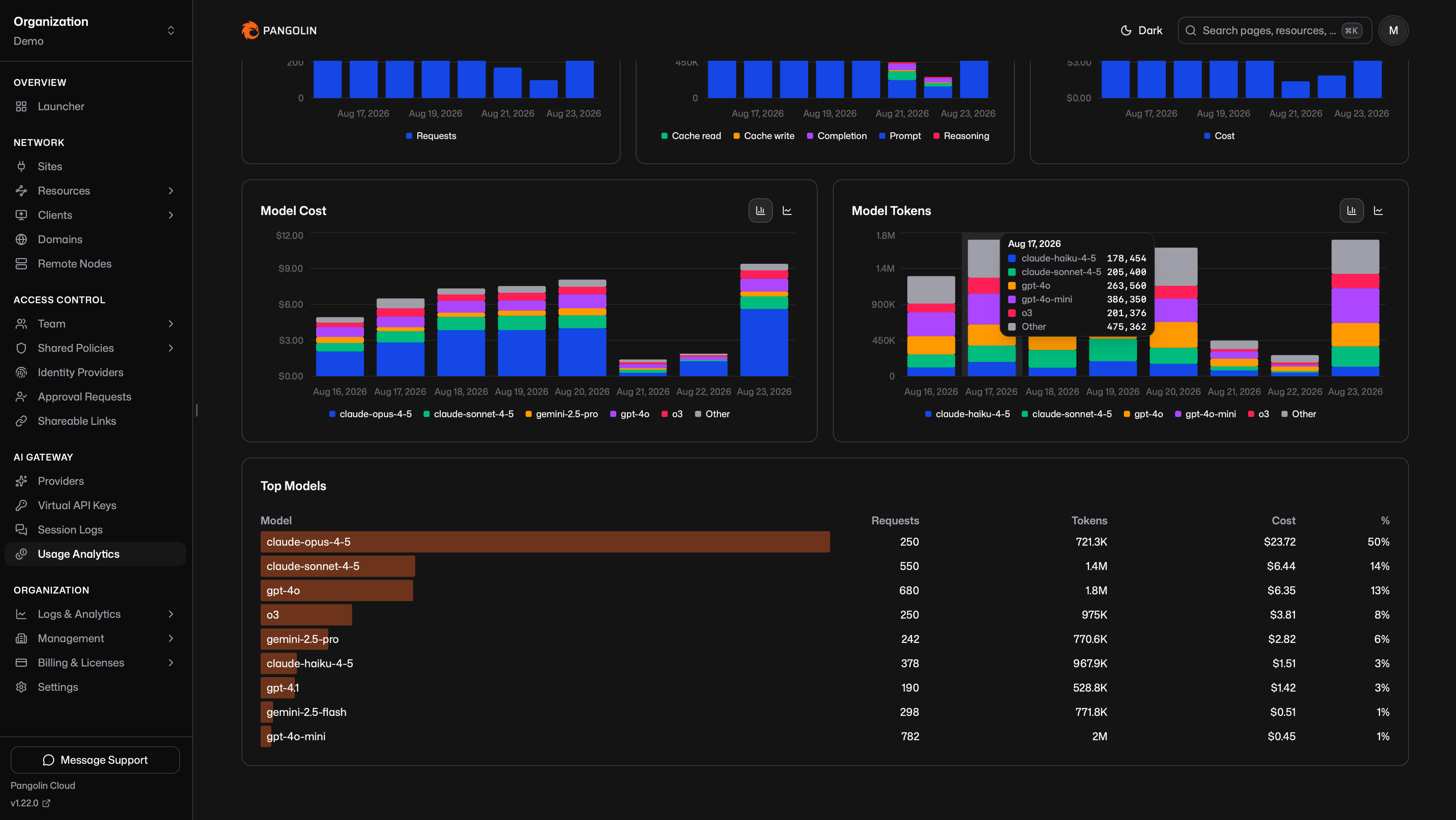
Usage analytics rolls up every AI Gateway call: how many requests ran, how many tokens they used, and estimated USD. Open **AI Gateway → Usage Analytics**. The numbers come from the same recorded usage that [budgets](/manage/ai/budgets) enforce.
 These records are independent of session log retention. For prompt and response text, see [Session Logs](/manage/ai/session-logs). The two share a session id per call.
## How Numbers Are Calculated [#how-numbers-are-calculated]
USD uses [catalog](/manage/ai/model-catalog) rates (`in`, `out`, `cache`, `reasoning`) when the model id is known. Unknown models have no USD amount. Tokens still sum.
Token buckets are prompt, cache-read, cache-write, completion, and reasoning. If the upstream omits usage, Pangolin estimates tokens from the request and response. Overview shows **Estimated**: the share of requests that used that path.
A non-2xx response from the provider still counts as a request with zero tokens, so volume charts include failed attempts.
These figures are estimates for the dashboard and for budgets, not a copy of the vendor invoice. See [Budgets](/manage/ai/budgets) for the same calculation used at enforcement time.
## Filters [#filters]
Every tab uses the same filters. The default date range is the last seven days.
* Provider
* Model
* Resource
* Role
* User
* Virtual API key
## Tabs [#tabs]
**Overview** shows totals for requests, tokens, cost, and estimated percent, daily charts for each, and top models by cost.
**Providers**, **Resources**, **Roles**, **Users**, and **Virtual API Keys** each show cost and token trends plus a ranked list for that dimension.
Role is derived from the caller's org roles. Usage rows store the user id, not the role. A [manual key](/manage/ai/virtual-api-keys#manual-keys) with no attributed user appears as an unknown user.
These records are independent of session log retention. For prompt and response text, see [Session Logs](/manage/ai/session-logs). The two share a session id per call.
## How Numbers Are Calculated [#how-numbers-are-calculated]
USD uses [catalog](/manage/ai/model-catalog) rates (`in`, `out`, `cache`, `reasoning`) when the model id is known. Unknown models have no USD amount. Tokens still sum.
Token buckets are prompt, cache-read, cache-write, completion, and reasoning. If the upstream omits usage, Pangolin estimates tokens from the request and response. Overview shows **Estimated**: the share of requests that used that path.
A non-2xx response from the provider still counts as a request with zero tokens, so volume charts include failed attempts.
These figures are estimates for the dashboard and for budgets, not a copy of the vendor invoice. See [Budgets](/manage/ai/budgets) for the same calculation used at enforcement time.
## Filters [#filters]
Every tab uses the same filters. The default date range is the last seven days.
* Provider
* Model
* Resource
* Role
* User
* Virtual API key
## Tabs [#tabs]
**Overview** shows totals for requests, tokens, cost, and estimated percent, daily charts for each, and top models by cost.
**Providers**, **Resources**, **Roles**, **Users**, and **Virtual API Keys** each show cost and token trends plus a ranked list for that dimension.
Role is derived from the caller's org roles. Usage rows store the user id, not the role. A [manual key](/manage/ai/virtual-api-keys#manual-keys) with no attributed user appears as an unknown user.