> ## Documentation Index
> Fetch the complete documentation index at: https://docs.pangolin.net/llms.txt
> Use this file to discover all available pages before exploring further.
# Shareable Links
> Create Links and use access tokens for browser or programmatic access.
Fastest way to get started with Pangolin using the hosted control plane. No credit card required.
Links are special URLs that grant access to one resource without requiring the recipient to sign in as a Pangolin user. Anyone with a web browser on the internet can access the resource if they have a valid Link.
When you create a Link, Pangolin gives you two ways to use it:
* **Link**: This is a Pangolin-hosted URL that validates the validity of the Link and then redirects them to the resource.
* **Access Token Usage**: Use this only when making direct requests to the resource URL from scripts, tools, or integrations.
## Create a Link
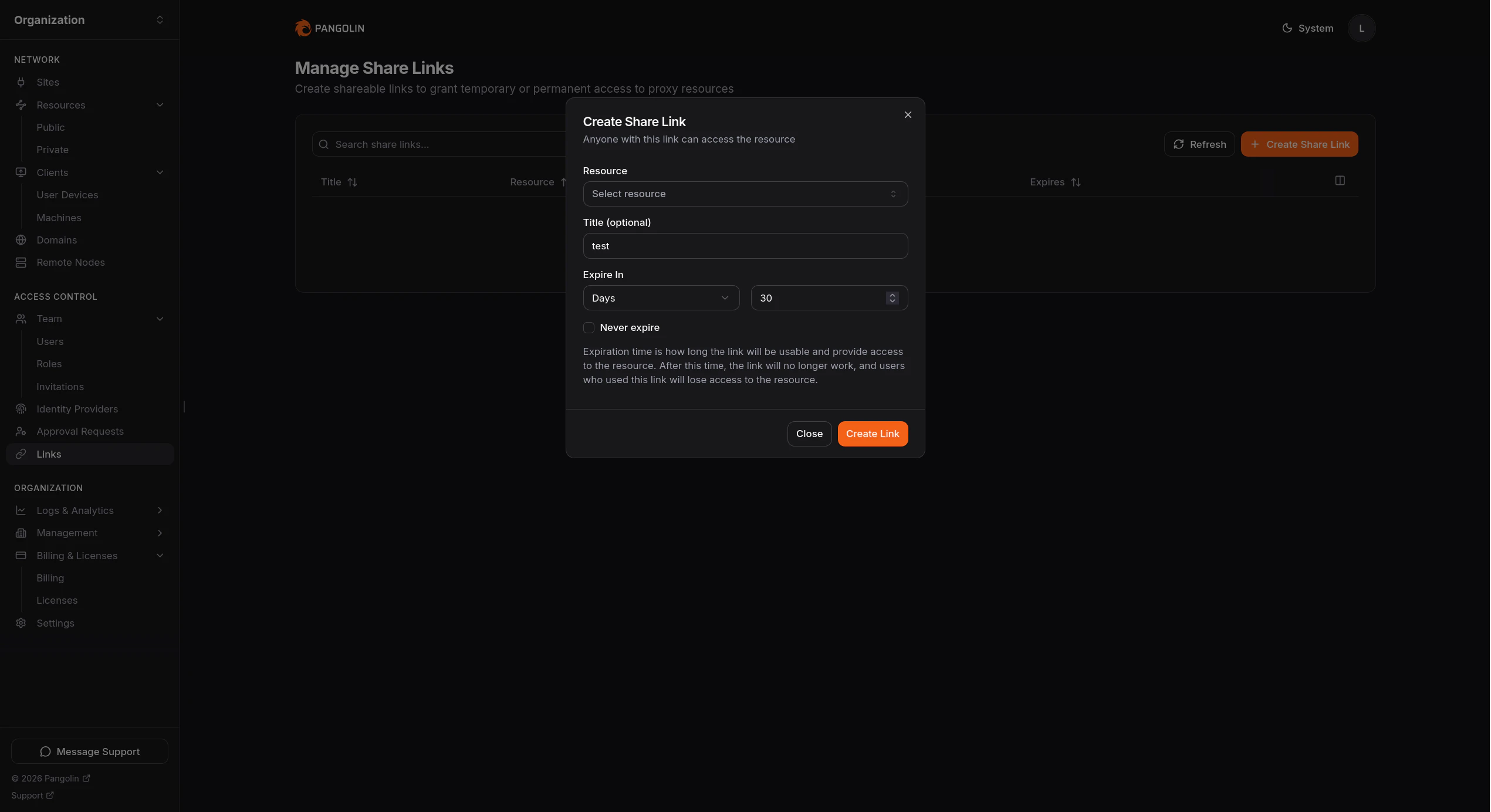
From the resource authentication flow, create a Link by:
1. Choosing the target resource.
2. Adding a title if you want the link to be easy to identify later.
3. Setting an expiration, or enabling **Never expire** if the link should stay valid until you revoke it.
4. Copying the generated link or access-token details immediately after creation.
 Anyone with the Link or access token can use it. Treat both like credentials.
## Use the Access Token
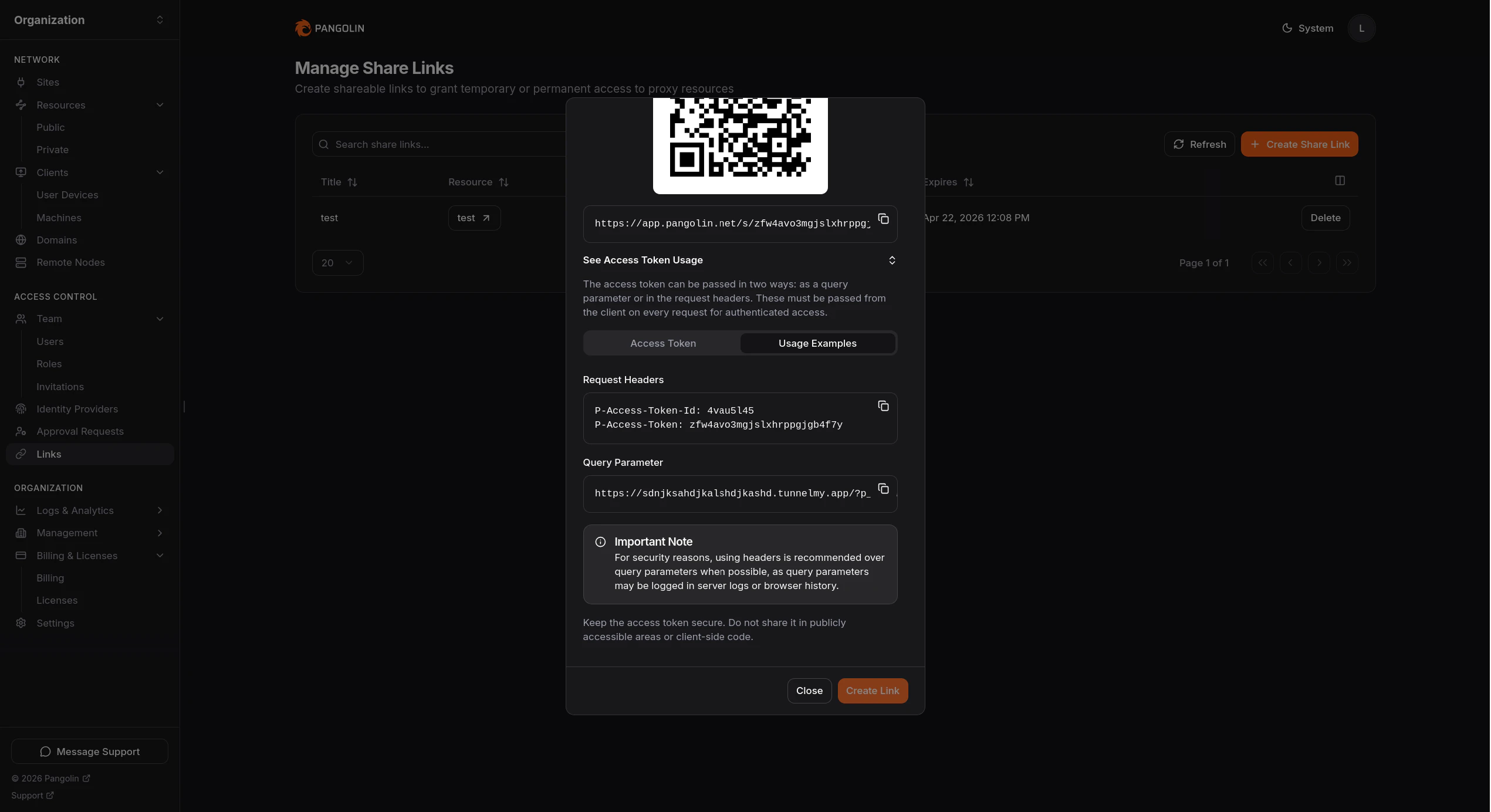
Pangolin can accept a Link access token in either the query string or request headers.
If you are sending access to a person, use the copied **Link** shown at the top of the modal.
Use **Access Token Usage** only when you are calling the resource URL directly on each request.
This is why the two URLs often look different:
* The **Link** is usually on your Pangolin domain.
* The **Access Token Usage** examples use the resource URL directly.
Anyone with the Link or access token can use it. Treat both like credentials.
## Use the Access Token
Pangolin can accept a Link access token in either the query string or request headers.
If you are sending access to a person, use the copied **Link** shown at the top of the modal.
Use **Access Token Usage** only when you are calling the resource URL directly on each request.
This is why the two URLs often look different:
* The **Link** is usually on your Pangolin domain.
* The **Access Token Usage** examples use the resource URL directly.
 ### Query Parameter
Pangolin accepts the access token in the `p_token` query parameter:
```bash theme={"theme":"gruvbox-light-hard"}
curl "https://resource.example.com/?p_token=."
```
The query-string value is the token ID and token joined with a `.`.
Some deployments may use a different query parameter name.
The query parameter must be sent in every request to the resource, not just the first time.
### Request Headers
By default, Pangolin accepts these headers:
* `P-Access-Token-Id`
* `P-Access-Token`
Example:
```bash theme={"theme":"gruvbox-light-hard"}
curl \
-H "P-Access-Token-Id: " \
-H "P-Access-Token: " \
"https://resource.example.com/"
```
This is the same token data as the query-string form, split into two headers instead of `.`.
Some deployments may use different header names.
The headers must be sent in every request to the resource, not just the first time.
## Expiration and Revocation
* Expiring links stop working automatically when their lifetime ends.
* Non-expiring links remain valid until you delete them.
* Deleting the Link revokes both the Link and its access token.
## Important Notes
* Links are best for targeted sharing and automation, not broad long-term access.
* Link-based access does not carry per-user identity headers to the upstream app. For identity-aware upstream integrations, see [Forwarded Headers](/manage/access-control/forwarded-headers).
### Query Parameter
Pangolin accepts the access token in the `p_token` query parameter:
```bash theme={"theme":"gruvbox-light-hard"}
curl "https://resource.example.com/?p_token=."
```
The query-string value is the token ID and token joined with a `.`.
Some deployments may use a different query parameter name.
The query parameter must be sent in every request to the resource, not just the first time.
### Request Headers
By default, Pangolin accepts these headers:
* `P-Access-Token-Id`
* `P-Access-Token`
Example:
```bash theme={"theme":"gruvbox-light-hard"}
curl \
-H "P-Access-Token-Id: " \
-H "P-Access-Token: " \
"https://resource.example.com/"
```
This is the same token data as the query-string form, split into two headers instead of `.`.
Some deployments may use different header names.
The headers must be sent in every request to the resource, not just the first time.
## Expiration and Revocation
* Expiring links stop working automatically when their lifetime ends.
* Non-expiring links remain valid until you delete them.
* Deleting the Link revokes both the Link and its access token.
## Important Notes
* Links are best for targeted sharing and automation, not broad long-term access.
* Link-based access does not carry per-user identity headers to the upstream app. For identity-aware upstream integrations, see [Forwarded Headers](/manage/access-control/forwarded-headers).