> ## Documentation Index
> Fetch the complete documentation index at: https://docs.pangolin.net/llms.txt
> Use this file to discover all available pages before exploring further.
# AI Gateway Overview
> Route coding agents and AI clients through Pangolin with centralized providers and access control
An AI Gateway resource is a normal Pangolin resource that proxies requests to one or more upstream AI providers (OpenAI, Anthropic, Google Gemini, Bedrock, Vertex AI, or a custom endpoint). Point a client at the resource's URL instead of the provider's, and Pangolin handles auth, access control, and logging in front of it.
## How It Fits Together
* **[Providers](/manage/ai/providers/overview)** are configured once per organization - the upstream URL, API key, and capabilities for OpenAI, Anthropic, etc.
* **Resources** (type `AI Gateway`) attach one or more of those providers and get a normal Pangolin domain.
* **[Virtual API Keys](/manage/ai/virtual-api-keys)** are what clients send to a **public** AI Gateway resource. Private resources are reached through the Pangolin network, so the gateway does not check a key.
* The **[Model Catalog](/manage/ai/model-catalog)** is the known-model list and token pricing used by [model routing](/manage/ai/providers/model-routing) and budgets.
* **[Budgets](/manage/ai/budgets)** cap estimated USD spend or token usage on a provider, model, resource, role, or key.
* **[Session Logs](/manage/ai/session-logs)** store prompt and response transcripts for each call.
* **[Usage Analytics](/manage/ai/usage-analytics)** charts cost, tokens, and request volume across providers, resources, roles, users, and keys.
A resource only understands the API format(s) its attached providers support. An Anthropic provider makes the resource speak the Anthropic Messages API; an OpenAI provider makes it speak Chat Completions/Responses; a Gemini provider makes it speak Gemini's `generateContent` API. Attach whichever providers match the clients you plan to connect. See [AI Providers](/manage/ai/providers/overview) for per-type setup and [Provider Configuration](/manage/ai/providers/configuration) for capabilities, auth, and model lists.
## 1. Add a Provider
Create an org-level provider so the gateway has an upstream to call. Sidebar → **AI Gateway** → **Providers** → **Create**, or follow the [AI Providers](/manage/ai/providers/overview) guide. Pick a type, paste in its API key, and save. You can add as many as you need.
## 2. Create a Resource
Resources → **Create** → set **Type** to **AI Gateway**, pick a domain, and attach the provider(s) from step 1. You can also attach providers to an existing resource later from its **AI Gateway** settings tab. How public and private AI Gateway resources reach users is covered on the [public](/manage/resources/public/ai-gateway) and [private](/manage/resources/private/ai-gateway) resource type pages.
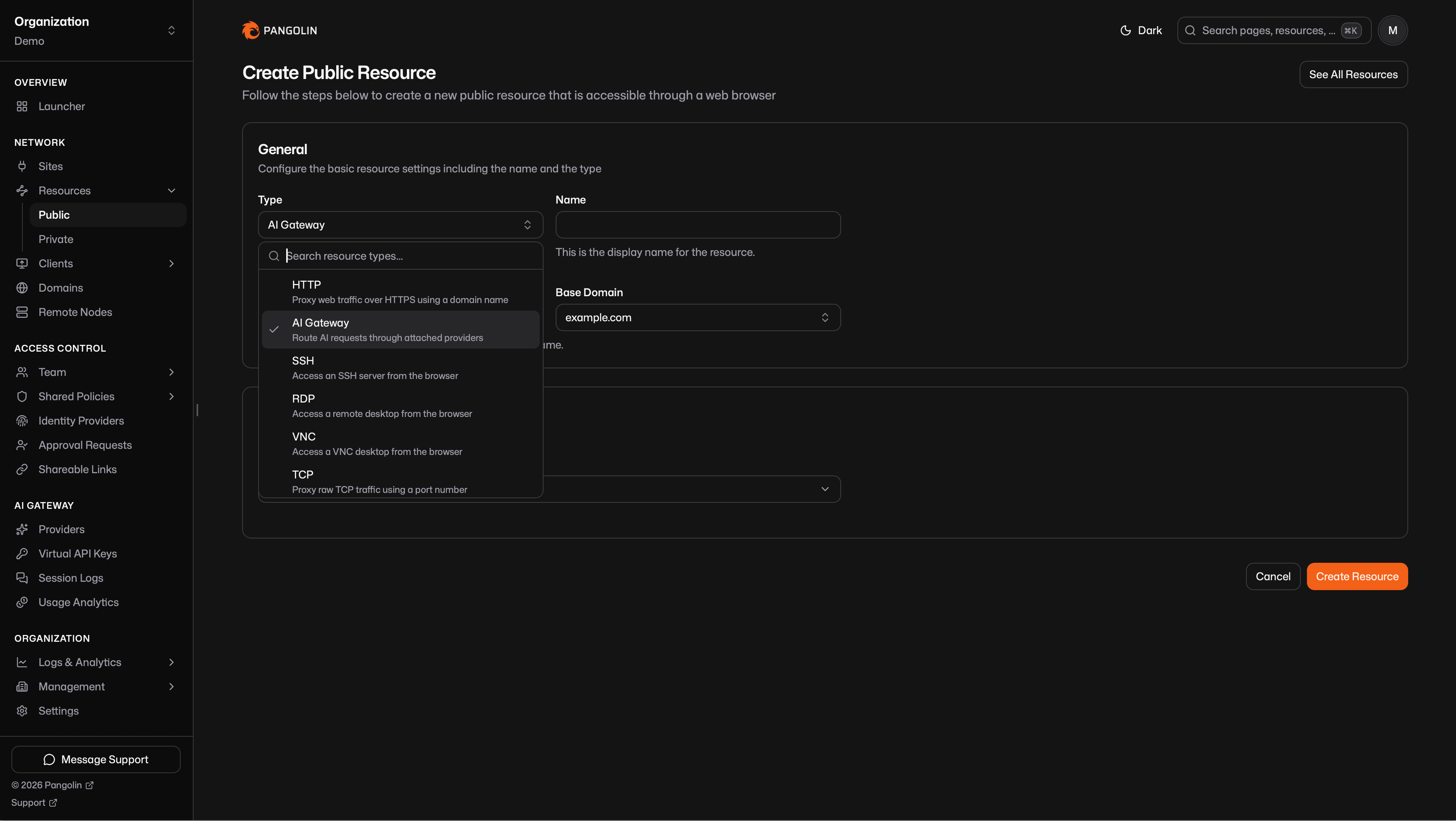 You can create more than one AI Gateway resource so different users and roles get their own providers. Distinct hostnames are the usual approach; they can also share a FQDN. See [Multiple Gateway Resources](/manage/ai/multiple-gateway-resources).
## 3. Authenticate to the Gateway
How a client authenticates depends on whether the resource is public or private.
### Private Resources
Reachable only on devices connected with the [Pangolin client](/manage/clients/install-client). Identity comes from that connection, so you do not issue a [virtual API key](/manage/ai/virtual-api-keys). The desktop client already proved who is calling. Details are on the [private AI Gateway](/manage/resources/private/ai-gateway) resource page.
### Public Resources
Reachable from anywhere. The gateway checks a [virtual API key](/manage/ai/virtual-api-keys) on every call. Details are on the [public AI Gateway](/manage/resources/public/ai-gateway) resource page.
## 4. Connect a Coding Agent, Agent, or AI Client to the Gateway
Every resource has ready-to-copy setup for common clients, and `pangolin configure ` can write the config for you. Full instructions per client:
| Client | Needs a provider that speaks | Guide |
| ----------- | ------------------------------------- | ------------------------------------------------------- |
| Claude Code | Anthropic Messages | [Setup guide](/manage/ai/configure-ai-clients/claude) |
| Codex | OpenAI Chat/Responses | [Setup guide](/manage/ai/configure-ai-clients/codex) |
| OpenCode | Anthropic Messages and/or OpenAI Chat | [Setup guide](/manage/ai/configure-ai-clients/opencode) |
| Gemini CLI | Gemini `generateContent` | [Setup guide](/manage/ai/configure-ai-clients/gemini) |
There are also guides for pointing other tools at a Pangolin AI Gateway resource:
* [Open WebUI](/manage/ai/configure-ai-clients/open-webui)
* [Claude Desktop](/manage/ai/configure-ai-clients/claude-desktop)
* [OpenClaw](/manage/ai/configure-ai-clients/openclaw)
## Supported Providers
Each type has its own configuration guide. Capabilities (which API formats a provider speaks) are explained in [Provider Configuration](/manage/ai/providers/configuration#capabilities).
| Provider | Default capabilities | Guide |
| ----------------- | ------------------------------------- | --------------------------------------------------- |
| OpenAI | Chat Completions, Responses | [Configure](/manage/ai/providers/openai) |
| Anthropic | Messages | [Configure](/manage/ai/providers/anthropic) |
| Google Gemini | `generateContent` | [Configure](/manage/ai/providers/google-gemini) |
| Vertex AI | Google `generateContent`/`rawPredict` | [Configure](/manage/ai/providers/vertex-ai) |
| Amazon Bedrock | Converse | [Configure](/manage/ai/providers/bedrock) |
| Microsoft Foundry | Chat Completions, Responses, Messages | [Configure](/manage/ai/providers/microsoft-foundry) |
| OpenRouter | Chat Completions | [Configure](/manage/ai/providers/open-router) |
| Vercel AI Gateway | Chat Completions, Responses | [Configure](/manage/ai/providers/vercel-ai-gateway) |
| Custom | Whatever you select | [Configure](/manage/ai/providers/custom) |
Use [Custom](/manage/ai/providers/custom) for any upstream that isn't in the typed list. Assign whichever capabilities it speaks - OpenAI, Anthropic, Gemini, Vertex, Bedrock, or a mix. A Moonshot AI (Kimi) endpoint is one example: select Anthropic Messages and point at its Anthropic-compatible URL.
You can create more than one AI Gateway resource so different users and roles get their own providers. Distinct hostnames are the usual approach; they can also share a FQDN. See [Multiple Gateway Resources](/manage/ai/multiple-gateway-resources).
## 3. Authenticate to the Gateway
How a client authenticates depends on whether the resource is public or private.
### Private Resources
Reachable only on devices connected with the [Pangolin client](/manage/clients/install-client). Identity comes from that connection, so you do not issue a [virtual API key](/manage/ai/virtual-api-keys). The desktop client already proved who is calling. Details are on the [private AI Gateway](/manage/resources/private/ai-gateway) resource page.
### Public Resources
Reachable from anywhere. The gateway checks a [virtual API key](/manage/ai/virtual-api-keys) on every call. Details are on the [public AI Gateway](/manage/resources/public/ai-gateway) resource page.
## 4. Connect a Coding Agent, Agent, or AI Client to the Gateway
Every resource has ready-to-copy setup for common clients, and `pangolin configure ` can write the config for you. Full instructions per client:
| Client | Needs a provider that speaks | Guide |
| ----------- | ------------------------------------- | ------------------------------------------------------- |
| Claude Code | Anthropic Messages | [Setup guide](/manage/ai/configure-ai-clients/claude) |
| Codex | OpenAI Chat/Responses | [Setup guide](/manage/ai/configure-ai-clients/codex) |
| OpenCode | Anthropic Messages and/or OpenAI Chat | [Setup guide](/manage/ai/configure-ai-clients/opencode) |
| Gemini CLI | Gemini `generateContent` | [Setup guide](/manage/ai/configure-ai-clients/gemini) |
There are also guides for pointing other tools at a Pangolin AI Gateway resource:
* [Open WebUI](/manage/ai/configure-ai-clients/open-webui)
* [Claude Desktop](/manage/ai/configure-ai-clients/claude-desktop)
* [OpenClaw](/manage/ai/configure-ai-clients/openclaw)
## Supported Providers
Each type has its own configuration guide. Capabilities (which API formats a provider speaks) are explained in [Provider Configuration](/manage/ai/providers/configuration#capabilities).
| Provider | Default capabilities | Guide |
| ----------------- | ------------------------------------- | --------------------------------------------------- |
| OpenAI | Chat Completions, Responses | [Configure](/manage/ai/providers/openai) |
| Anthropic | Messages | [Configure](/manage/ai/providers/anthropic) |
| Google Gemini | `generateContent` | [Configure](/manage/ai/providers/google-gemini) |
| Vertex AI | Google `generateContent`/`rawPredict` | [Configure](/manage/ai/providers/vertex-ai) |
| Amazon Bedrock | Converse | [Configure](/manage/ai/providers/bedrock) |
| Microsoft Foundry | Chat Completions, Responses, Messages | [Configure](/manage/ai/providers/microsoft-foundry) |
| OpenRouter | Chat Completions | [Configure](/manage/ai/providers/open-router) |
| Vercel AI Gateway | Chat Completions, Responses | [Configure](/manage/ai/providers/vercel-ai-gateway) |
| Custom | Whatever you select | [Configure](/manage/ai/providers/custom) |
Use [Custom](/manage/ai/providers/custom) for any upstream that isn't in the typed list. Assign whichever capabilities it speaks - OpenAI, Anthropic, Gemini, Vertex, Bedrock, or a mix. A Moonshot AI (Kimi) endpoint is one example: select Anthropic Messages and point at its Anthropic-compatible URL.