> ## Documentation Index
> Fetch the complete documentation index at: https://docs.pangolin.net/llms.txt
> Use this file to discover all available pages before exploring further.
# Authentication Logs
> Authentication logs are a record of each authenticated access attempt to a resource
Fastest way to get started with Pangolin using the hosted control plane. No credit card required.
Authentication logs provide detailed information about each access attempt made to your Pangolin resources. These logs help you monitor and analyze user activity each time they attempt to authenticate.
Authentication logs are only available in [Pangolin Cloud](https://app.pangolin.net/auth/signup) or self-hosted [Enterprise Edition](/self-host/enterprise-edition).
## What are Authentication Logs?
Authentication logs capture authentication events when users or API keys attempt to access a resource. They record whether the authentication was successful or failed, along with contextual information about the attempt. These logs are useful for:
* Monitoring authentication patterns and login attempts
* Tracking which users are accessing which resources
* Identifying failed authentication attempts for security analysis
* Understanding geographic distribution of access attempts
* Analyzing user agent and device information
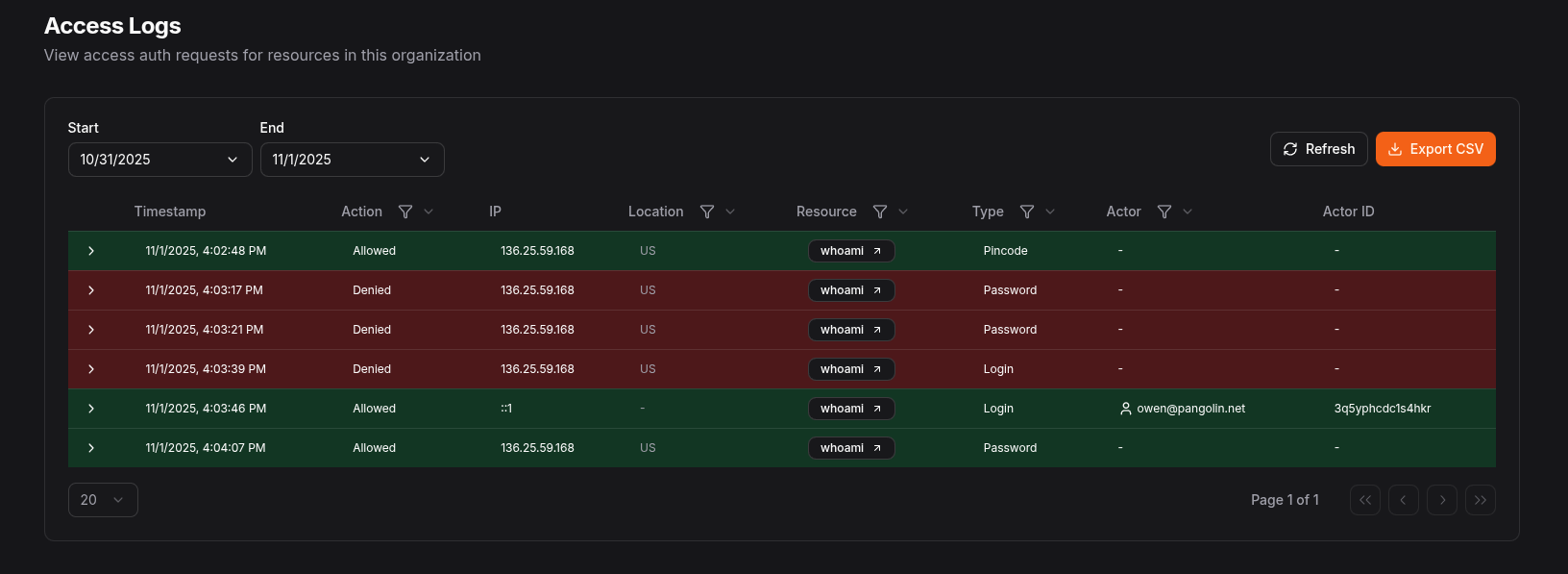 Make sure to enable authentication logs in the org settings
## Authentication Log Fields
Each authentication log entry contains the following fields:
| Field | Type | Description |
| ------------ | ------- | ----------------------------------------------------------------------- |
| `timestamp` | number | Unix timestamp (in seconds) when the access attempt occurred |
| `action` | boolean | Whether the access was allowed (`true`) or denied (`false`) |
| `type` | string | The type of authentication event (e.g., "login", "password", "pincode") |
| `actorType` | string | The type of actor making the access attempt ("user" or "apiKey") |
| `actor` | string | The display name of the actor (username or API key name) |
| `actorId` | string | The unique identifier for the actor (user ID or API key ID) |
| `resourceId` | number | The ID of the resource being accessed (if applicable) |
| `ip` | string | The IP address of the client making the access attempt |
| `location` | string | The geographic location (country code) based on IP address |
| `userAgent` | string | The user agent string of the client browser or application |
| `metadata` | string | Additional contextual information in JSON format |
## Log Retention
Authentication log retention is controlled by the organization setting. By default, authentication logs are retained for 0 days (disabled).
## Exporting
Logs can be exported into CSV format for external analysis and archival. Logs can be exported from the table view in the Pangolin dashboard or via the Pangolin API. When exporting, you can specify date ranges and filters to narrow down the logs you need.
Make sure to enable authentication logs in the org settings
## Authentication Log Fields
Each authentication log entry contains the following fields:
| Field | Type | Description |
| ------------ | ------- | ----------------------------------------------------------------------- |
| `timestamp` | number | Unix timestamp (in seconds) when the access attempt occurred |
| `action` | boolean | Whether the access was allowed (`true`) or denied (`false`) |
| `type` | string | The type of authentication event (e.g., "login", "password", "pincode") |
| `actorType` | string | The type of actor making the access attempt ("user" or "apiKey") |
| `actor` | string | The display name of the actor (username or API key name) |
| `actorId` | string | The unique identifier for the actor (user ID or API key ID) |
| `resourceId` | number | The ID of the resource being accessed (if applicable) |
| `ip` | string | The IP address of the client making the access attempt |
| `location` | string | The geographic location (country code) based on IP address |
| `userAgent` | string | The user agent string of the client browser or application |
| `metadata` | string | Additional contextual information in JSON format |
## Log Retention
Authentication log retention is controlled by the organization setting. By default, authentication logs are retained for 0 days (disabled).
## Exporting
Logs can be exported into CSV format for external analysis and archival. Logs can be exported from the table view in the Pangolin dashboard or via the Pangolin API. When exporting, you can specify date ranges and filters to narrow down the logs you need.