> ## Documentation Index
> Fetch the complete documentation index at: https://docs.pangolin.net/llms.txt
> Use this file to discover all available pages before exploring further.
# Admin Action Logs
> Admin Action logs are a record of each event taken by users in the organization
Fastest way to get started with Pangolin using the hosted control plane. No credit card required.
Admin Action logs provide an audit trail of administrative actions and configuration changes made within your Pangolin organization. These logs help you track who made what changes and when.
Admin Action logs are only available in [Pangolin Cloud](https://app.pangolin.net/auth/signup) or self-hosted [Enterprise Edition](/self-host/enterprise-edition).
## What are Admin Action Logs?
Admin Action logs capture administrative events and configuration changes performed by users or API keys in the Pangolin dashboard. They record management operations such as creating resources, modifying settings, managing users, and other organizational changes. These logs are useful for:
* Maintaining an audit trail of configuration changes
* Tracking administrative actions for compliance
* Identifying who made specific changes to your infrastructure
* Troubleshooting configuration issues by reviewing recent changes
* Meeting security and compliance requirements
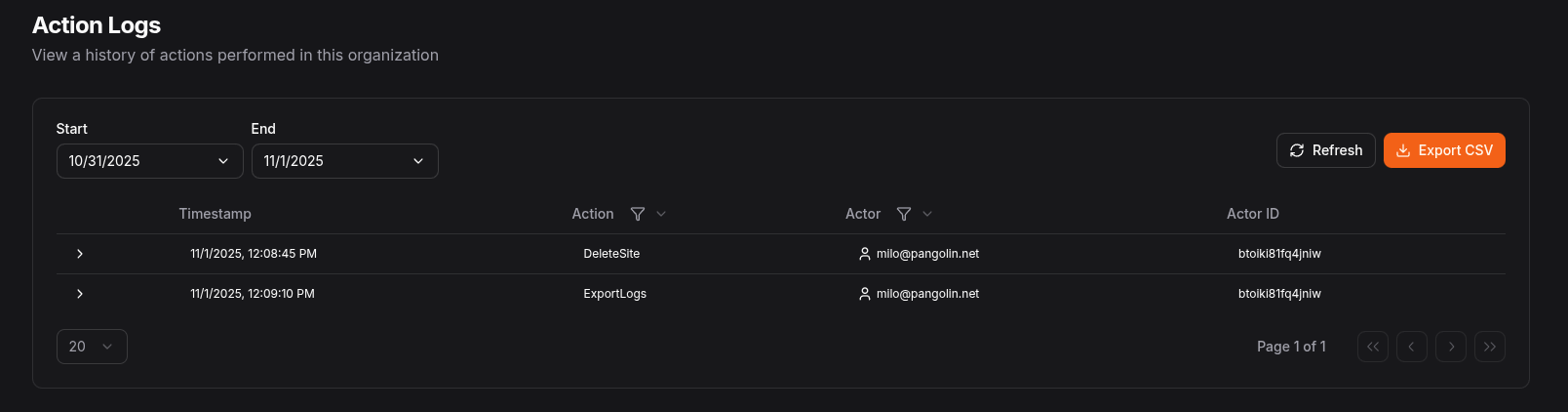 Make sure to enable access logs in the org settings
## Admin Action Log Fields
Each action log entry contains the following fields:
| Field | Type | Description |
| ----------- | ------ | ----------------------------------------------------------------------------------------------------- |
| `timestamp` | number | Unix timestamp (in seconds) when the action was performed |
| `action` | string | The specific action that was performed (e.g., "createResource", "updateUser", "deleteTarget") |
| `actorType` | string | The type of actor performing the action ("user" or "apiKey") |
| `actor` | string | The display name of the actor (username or API key name) |
| `actorId` | string | The unique identifier for the actor (user ID or API key ID) |
| `metadata` | string | Additional contextual information about the action in JSON format (often contains request parameters) |
## Log Retention
Admin Action log retention is controlled by the organization settings. By default, admin action logs are retained for 0 days (disabled).
## Exporting
Logs can be exported into CSV format for external analysis and archival. Logs can be exported from the table view in the Pangolin dashboard or via the Pangolin API. When exporting, you can specify date ranges and filters to narrow down the logs you need.
Make sure to enable access logs in the org settings
## Admin Action Log Fields
Each action log entry contains the following fields:
| Field | Type | Description |
| ----------- | ------ | ----------------------------------------------------------------------------------------------------- |
| `timestamp` | number | Unix timestamp (in seconds) when the action was performed |
| `action` | string | The specific action that was performed (e.g., "createResource", "updateUser", "deleteTarget") |
| `actorType` | string | The type of actor performing the action ("user" or "apiKey") |
| `actor` | string | The display name of the actor (username or API key name) |
| `actorId` | string | The unique identifier for the actor (user ID or API key ID) |
| `metadata` | string | Additional contextual information about the action in JSON format (often contains request parameters) |
## Log Retention
Admin Action log retention is controlled by the organization settings. By default, admin action logs are retained for 0 days (disabled).
## Exporting
Logs can be exported into CSV format for external analysis and archival. Logs can be exported from the table view in the Pangolin dashboard or via the Pangolin API. When exporting, you can specify date ranges and filters to narrow down the logs you need.