> ## Documentation Index
> Fetch the complete documentation index at: https://docs.pangolin.net/llms.txt
> Use this file to discover all available pages before exploring further.
# SSH
> Access a remote shell in the browser with password, key, or Pangolin identity authentication
Fastest way to get started with Pangolin using the hosted control plane. No credit card required.
Only available in [Pangolin Cloud](https://app.pangolin.net/auth/signup) and [Enterprise Edition](/self-host/enterprise-edition).
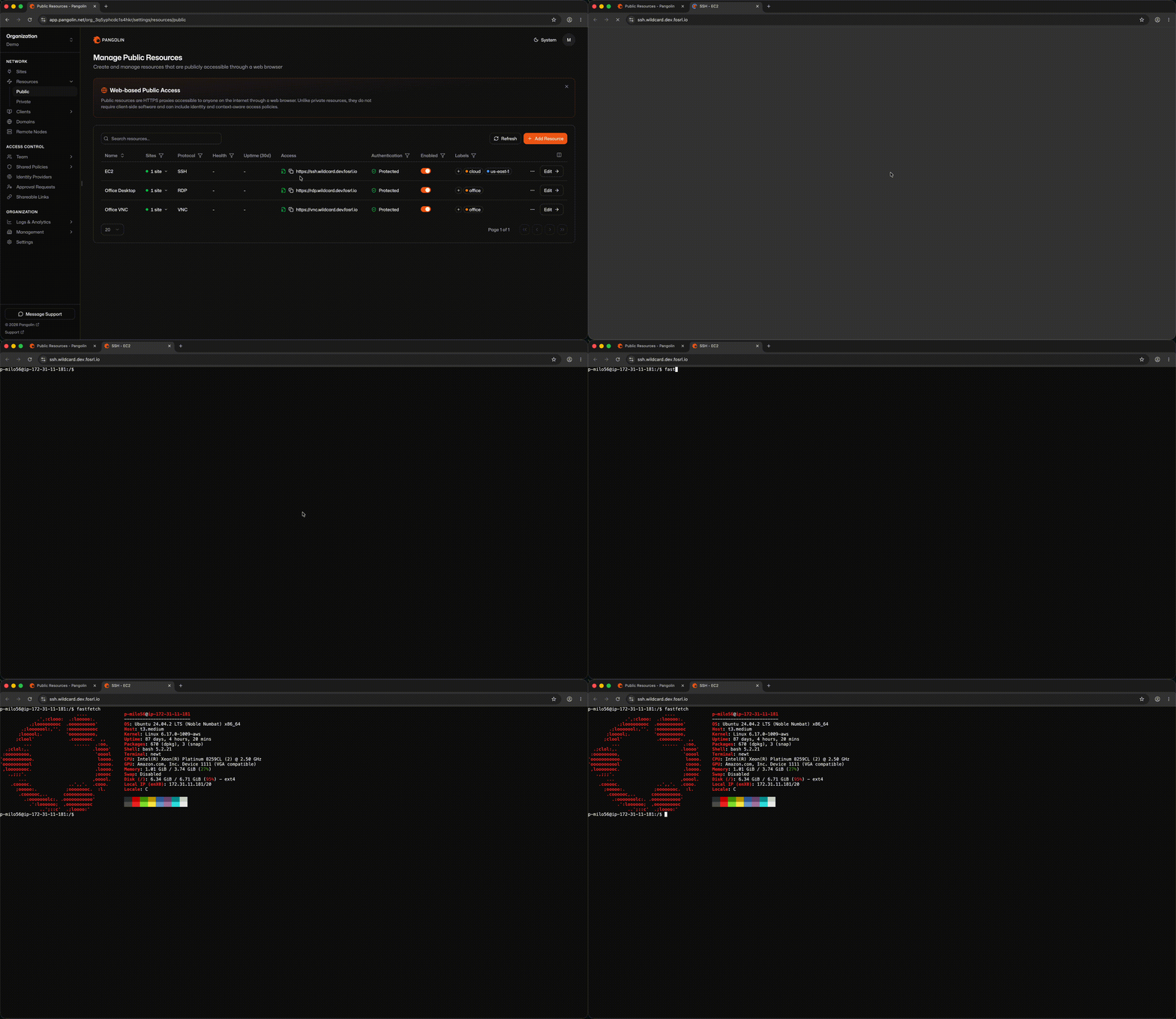
SSH public resources render a full interactive terminal in the browser. Users visit a FQDN—no SSH client or Pangolin desktop client is required.
 ## How It Works
1. You assign a FQDN on a domain managed in Pangolin.
2. The user completes [public resource authentication](/manage/resources/public/authentication) in the browser (platform SSO, identity providers, access rules, and so on).
3. Depending on the SSH [configuration](/manage/ssh#configuration-options) you chose, the user may be prompted for a second credential step or proceed directly into the terminal.
4. Pangolin renders the session and proxies traffic to the backend through a site connector.
## Site and Host Configuration
SSH public resources do **not** use [targets](/manage/resources/public/targets). Instead, you:
1. Select which sites can route to the resource.
2. Enter the backend host and port—unless you selected **Pangolin SSH** mode, which executes sessions on the site connector host and does not require a host or port.
**Pangolin SSH mode requires root.** Newt must run as root on the site connector host. Use `sudo newt ...` or run the Newt systemd service as root. See [Install a site](/manage/sites/install-site).
Pangolin routes through the site that is online and healthiest, using the same intelligent multi-site routing model as [private resources](/manage/resources/private/multi-site-routing).
## SSH Configuration
The SSH settings on a public resource use the same options as [private SSH resources](/manage/resources/private/ssh). Mode, authentication method, and auth daemon location are configured identically in the dashboard.
See [SSH Access](/manage/ssh) for a full explanation of each option, setup instructions, and an example for every configuration combination.
## How Public SSH Differs from Private SSH
| | Public SSH | [Private SSH](/manage/resources/private/ssh) |
| -------------------- | --------------------------------------------------------------------------------------------------------- | --------------------------------------------------------------------------------------------------------------------- |
| **Access** | Web browser at a public FQDN | Pangolin CLI: `pangolin ssh ` |
| **Client required** | No | Yes — user must be connected with the Pangolin client |
| **First auth layer** | [Public resource authentication](/manage/resources/public/authentication) — login page, SSO, access rules | Identity from the active client connection; [private resource access rules](/manage/resources/private/authentication) |
| **Hostname** | Public FQDN on your Pangolin domain | [Alias](/manage/resources/private/alias) on the private resource |
## Authentication and Access Rules
SSH public resources are protocol-aware and support the full set of Pangolin [authentication and access rules](/manage/resources/public/authentication). These rules gate who can reach the resource URL in the first place—before any SSH session or host credential prompt begins.
You can configure these settings inline on the resource or attach a shared [resource policy](/manage/resources/public/resource-policies) and add resource-specific overrides on top.
## How It Works
1. You assign a FQDN on a domain managed in Pangolin.
2. The user completes [public resource authentication](/manage/resources/public/authentication) in the browser (platform SSO, identity providers, access rules, and so on).
3. Depending on the SSH [configuration](/manage/ssh#configuration-options) you chose, the user may be prompted for a second credential step or proceed directly into the terminal.
4. Pangolin renders the session and proxies traffic to the backend through a site connector.
## Site and Host Configuration
SSH public resources do **not** use [targets](/manage/resources/public/targets). Instead, you:
1. Select which sites can route to the resource.
2. Enter the backend host and port—unless you selected **Pangolin SSH** mode, which executes sessions on the site connector host and does not require a host or port.
**Pangolin SSH mode requires root.** Newt must run as root on the site connector host. Use `sudo newt ...` or run the Newt systemd service as root. See [Install a site](/manage/sites/install-site).
Pangolin routes through the site that is online and healthiest, using the same intelligent multi-site routing model as [private resources](/manage/resources/private/multi-site-routing).
## SSH Configuration
The SSH settings on a public resource use the same options as [private SSH resources](/manage/resources/private/ssh). Mode, authentication method, and auth daemon location are configured identically in the dashboard.
See [SSH Access](/manage/ssh) for a full explanation of each option, setup instructions, and an example for every configuration combination.
## How Public SSH Differs from Private SSH
| | Public SSH | [Private SSH](/manage/resources/private/ssh) |
| -------------------- | --------------------------------------------------------------------------------------------------------- | --------------------------------------------------------------------------------------------------------------------- |
| **Access** | Web browser at a public FQDN | Pangolin CLI: `pangolin ssh ` |
| **Client required** | No | Yes — user must be connected with the Pangolin client |
| **First auth layer** | [Public resource authentication](/manage/resources/public/authentication) — login page, SSO, access rules | Identity from the active client connection; [private resource access rules](/manage/resources/private/authentication) |
| **Hostname** | Public FQDN on your Pangolin domain | [Alias](/manage/resources/private/alias) on the private resource |
## Authentication and Access Rules
SSH public resources are protocol-aware and support the full set of Pangolin [authentication and access rules](/manage/resources/public/authentication). These rules gate who can reach the resource URL in the first place—before any SSH session or host credential prompt begins.
You can configure these settings inline on the resource or attach a shared [resource policy](/manage/resources/public/resource-policies) and add resource-specific overrides on top.