

Blueprints
Define Pangolin resources and site settings declaratively with YAML or container labels
Blueprints let you define Pangolin resources as code. Instead of configuring every site, target, and access rule manually in the dashboard, you describe the desired state in YAML or container labels and let Pangolin apply it consistently.
Benefits
- Roll out the same resources and access settings across many sites without repeating dashboard work.
- Keep infrastructure and access settings in version control, where changes can be reviewed and rolled back.
- Template and automate configuration from CI, scripts, or provisioning tools.
- Keep a resource's definition next to the container it exposes with container labels.
Use Cases
- Stamp out an identical set of resources for every store, branch office, or customer site.
- Manage Pangolin resources through pull requests in a GitOps workflow.
- Define resources next to the Docker Compose services they expose, using container labels.
- Bootstrap new sites with their resources during provisioning.
How Blueprints Work
You describe the desired state in YAML or container labels and apply it through the dashboard, a site, the API, or the CLI. Pangolin matches each entry to an existing site, resource, or policy by its key and creates or updates it to match. A blueprint applied from a site file or container labels acts as an ongoing source of truth, while dashboard, API, and CLI applies are one-off. See How YAML Blueprints Are Applied.
Some features in this documentation are marked with (EE), which means they require Enterprise Edition.
Blueprint Mental Model
A blueprint can contain up to four top-level sections:
public-resources: Internet-facing HTTP, TCP, UDP, SSH, RDP, or VNC resourcesprivate-resources: Client-only access to hosts, CIDR ranges, or an exit nodepublic-policies: Reusable authentication and access policy objectssites: Site-level settings such as container label discovery
public-resources:
  <resource_key>:
    ...

private-resources:
  <resource_key>:
    ...

public-policies:
  <policy_key>:
    ...

sites:
  <site_key>:
    ...
Think of the resource key as your stable ID inside the blueprint. The fields under that key describe what Pangolin should create or maintain.
These keys are the same idea as the Identifier shown in the Pangolin app, called niceId in the API. Choose readable, stable keys such as warehouse-west or web-app; blueprints use them to match and update the same sites and resources on later applies. For more detail, see What is an identifier?.
Choose A Format
Pangolin supports two blueprint formats:
YAML
Use YAML when you want a readable file that can be committed to git, applied through a site, pasted into the UI, or sent through the API.
Container Labels
Use container labels when the resource definition should live inside your Compose stack. This is especially useful when a container and its Pangolin resource should be managed together.
How YAML Blueprints Are Applied
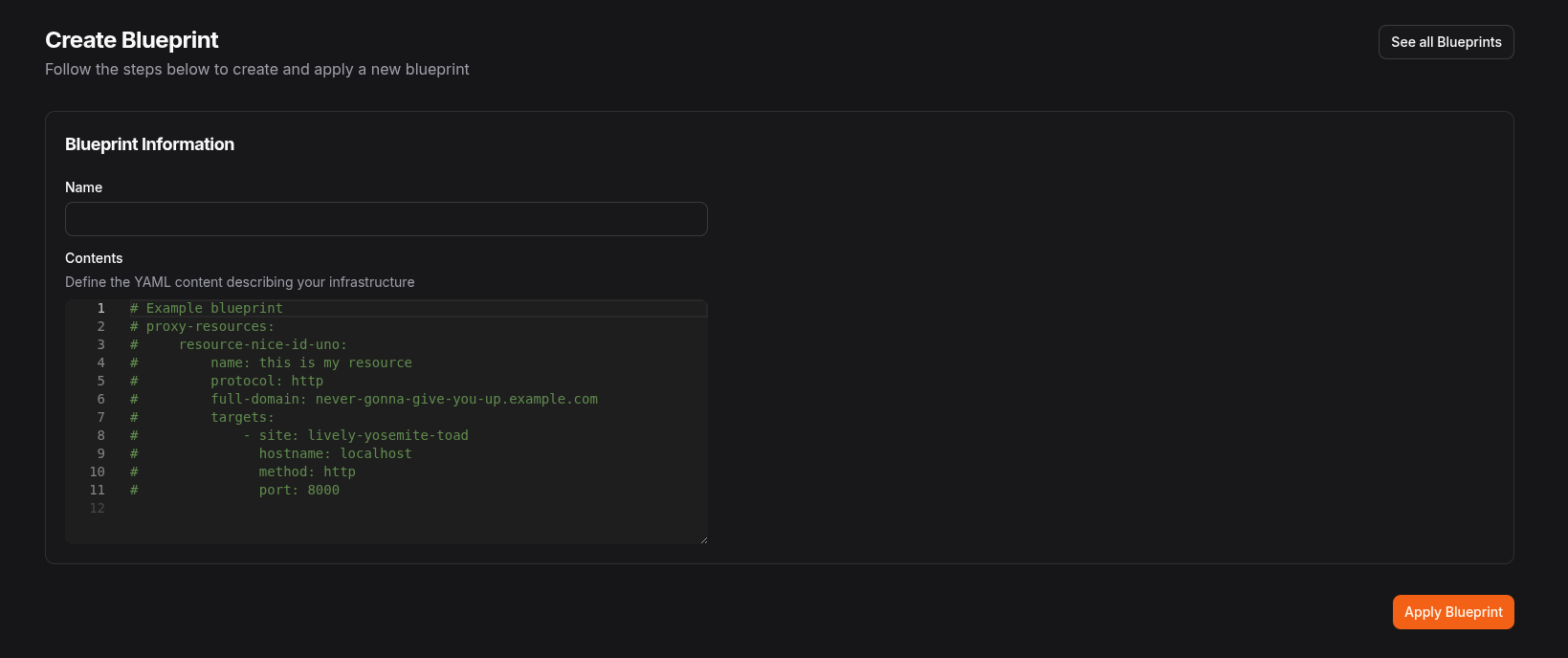
UI
Paste YAML into Settings > Blueprints in the Pangolin dashboard.
Site
Run a site with --blueprint-file to keep the file declarative and continuously applied:
pangolin up site --blueprint-file /path/to/blueprint.yaml --id <id> --secret <secret> --endpoint https://app.pangolin.netIf you only want a one-time bootstrap during provisioning, use --provisioning-blueprint-file instead.
API
Apply a blueprint through the Pangolin API with an API key. See the API documentation.
PUT /org/{orgId}/blueprint
{
  "blueprint": "base64-encoded-json-content"
}CLI
Apply a blueprint directly from the Pangolin CLI when you want a one-off apply from a terminal, CI job, or local automation.
Using your logged-in user account
First log in and select the organization you want the blueprint applied to:
pangolin login
pangolin select org --org <org_id>
Then apply the file:
pangolin apply blueprint --file /path/to/blueprint.yamlThe CLI uses your active account and selected organization. You can optionally set the saved blueprint name:
pangolin apply blueprint --file /path/to/blueprint.yaml --name productionUsing an Integration API key
For non-interactive automation, pass an Integration API key, API endpoint, and organization ID together:
pangolin apply blueprint \
  --file /path/to/blueprint.yaml \
  --api-key <api_key_id.api_key_secret> \
  --endpoint https://api.example.com \
  --org <org_id>
For Pangolin Cloud, use https://api.pangolin.net as the endpoint. For self-hosted Pangolin, use your API host, for example https://api.your-domain.com. See Integration API for creating API keys and enabling the API on self-hosted deployments.
You can also pipe a blueprint through stdin. When using stdin, provide --name because there is no filename to derive it from:
render-blueprint | pangolin apply blueprint --file - --name production--blueprint-file on a site and container labels behave as an ongoing source of truth. Dashboard edits can be overwritten the next time the blueprint is applied. UI, API, and CLI applies are typically one-off operations.
Quick Start YAML Example
This example shows three common top-level sections in one file:
public-resources:
  web-app:
    name: Web App
    mode: http
    full-domain: app.example.com
    auth:
      sso-enabled: true
      whitelist-users:
        - admin@example.com
    targets:
      - site: my-site
        hostname: app
        port: 8080
        method: http
        healthcheck:
          hostname: app
          port: 8080
          path: /health

private-resources:
  ssh-host:
    name: SSH Host
    mode: host
    sites:
      - my-site
    destination: 192.168.1.10
    tcp-ports: "22"
    roles:
      - DevOps

sites:
  my-site:
    name: My Site
    docker-socket-enabled: true
Public Resources
Public resources expose services through Pangolin.
- Use
httpfor websites, APIs, and dashboards - Use
tcporudpfor raw public services bound to a port on the Pangolin server - Use
ssh,rdp, orvncfor protocol-specific resources - Use
inferencefor an AI Gateway resource that proxies requests to one or more attached AI providers
Use mode for new blueprints. protocol is still accepted for backward compatibility and is normalized to mode.
HTTP Resource Example
public-resources:
  app:
    name: App
    mode: http
    full-domain: app.example.com
    host-header: app.internal
    tls-server-name: app.internal
    response-headers:
      - name: Access-Control-Allow-Origin
        value: *
    rules:
      - action: allow
        match: country
        value: US
      - action: deny
        match: path
        value: /admin
    auth:
      sso-enabled: true
      whitelist-users:
        - admin@example.com
    targets:
      - site: my-site
        hostname: app
        port: 8080
        method: http
When applying a blueprint from a site (using --blueprint-file or container labels), site on each target is optional. If omitted, the target is assigned to the site that applied the blueprint.
Raw TCP Or UDP Example
public-resources:
  mqtt:
    name: Mosquitto MQTT
    mode: tcp
    proxy-port: 1883
    targets:
      - site: my-site
        hostname: mqtt-server
        port: 1883
For raw resources:
proxy-portis required- Target
methodmust not be set authis not supported
Targets-Only Resources
A public resource can contain only targets. This is useful when you want to add or manage targets for an existing resource definition without repeating all resource-level fields.
public-resources:
  extra-targets:
    targets:
      - site: secondary-site
        hostname: app-2
        port: 8080
        method: http
      - site: tertiary-site
        hostname: app-3
        port: 8080
        method: http
When a resource is targets-only, name and mode are not required.
Authentication Example
Authentication is configured inside auth and is supported only for HTTP resources.
public-resources:
  secure-app:
    name: Secure App
    mode: http
    full-domain: secure.example.com
    auth:
      pincode: 123456
      password: strong-password
      basic-auth:
        user: demo
        password: change-me
      sso-enabled: true
      sso-roles:
        - Member
      sso-users:
        - user@example.com
      whitelist-users:
        - admin@example.com
Maintenance Page (EE)
The maintenance object lets you present a maintenance page for a public HTTP resource.
public-resources:
  app:
    name: App
    mode: http
    full-domain: app.example.com
    maintenance:
      enabled: true
      type: automatic
      title: Scheduled Maintenance
      message: We are upgrading the service.
      estimated-time: 2 hours
    targets:
      - site: my-site
        hostname: app
        port: 8080
        method: http
Maintenance type values:
forced: Always show the maintenance pageautomatic: Show it only when all targets are unhealthy or the sites are offline
AI Gateway (Inference) Example
Set mode: inference to turn a public resource into an AI Gateway that proxies requests to one or more AI providers already configured in the organization. Inference resources do not take targets.
public-resources:
  ai-gateway:
    name: AI Gateway
    mode: inference
    full-domain: ai.example.com
    ai-providers:
      - provider: openai-prod
        access-mode: select
        models:
          - gpt-4o
      - provider: anthropic-prod
        access-mode: inherit
    ai-budget:
      - amount: 100
        unit: usd
        period: monthly
enforcement: hardai-providersreferences AI providers by their identifier and is only allowed whenmode: inference.access-mode: selectlimits the resource to the listedmodels, which must already be on the provider's allow list.access-mode: inherituses the provider's own allow and block lists. See Model Routing for details.ai-budgetis a list of spend or usage limits enforced on the resource. Only one budget perunit/periodcombination is allowed.
Private Resources
Private resources define what Pangolin clients can reach after they connect to your organization.
- Use
mode: hostfor a single host or DNS name - Use
mode: cidrfor an entire network range - Use
mode: httpto expose an internal HTTP endpoint to clients via a private domain - Use
mode: sshfor SSH access workflows (including native auth-daemon mode) - Use
mode: inferencefor a private AI Gateway resource reachable only by Pangolin clients, not the public internet - Use
mode: exit-nodeto send all of a client's internet traffic out through the site network
When applying a blueprint from a site (using --blueprint-file or container labels), sites is optional. If omitted, the resource is assigned to the site that applied the blueprint.
private-resources:
  internal-net:
    name: Internal Network
    mode: cidr
    destination: 10.0.0.0/24
    sites:
      - my-site
    tcp-ports: "22,443,8000-9000"
    udp-ports: "53,123"
    disable-icmp: false
    alias: "*.internal.example.com"
    roles:
      - Developer
    users:
      - user@example.com
    machines:
      - machine-id-1

  internal-app:
    name: Internal App
    mode: http
    destination: 10.0.0.5
    destination-port: 8080
    sites:
      - my-site
    full-domain: app.internal.example.com
    ssl: true
    scheme: https
    roles:
      - Member
Exit Node Example
Set mode: exit-node to turn a site into an exit node. Clients with access to the resource route all of their internet traffic through the site network, so it egresses from the site instead of the client's local connection.
private-resources:
  office-exit:
    name: Office Exit Node
    mode: exit-node
    sites:
      - office-site
    roles:
      - Developer
    users:
- user@example.comdestinationis not needed. An exit node always routes the full range (0.0.0.0/0), and anydestinationyou set is ignored.- All TCP and UDP ports and ICMP are always allowed.
tcp-ports,udp-ports, anddisable-icmpare ignored. gatewayis accepted as an equivalent value formode.
Resource Labels
Attach labels to public and private resources to organize and filter them in the dashboard. These are the same labels manageable from Settings > Labels - not to be confused with the Docker container labels used to define blueprints from Compose.
public-resources:
  app:
    name: App
    mode: http
    full-domain: app.example.com
    labels:
      - production
      - team-infra
    targets:
      - site: my-site
        hostname: app
        port: 8080
method: http- Label names are matched case-insensitively against existing labels in the organization.
- If a label with that name doesn't already exist yet, Pangolin creates it automatically.
- Each apply replaces the resource's full label list with the list in the blueprint.
- Labels are not synced for targets-only public resources - omitting
labelson a targets-only update leaves existing labels untouched.
Container Labels Format
Container labels are the same blueprint schema flattened into dot-separated keys:
- Start every label with
pangolin. - Keep the same object path as YAML
- Use array indexes for lists, such as
[0]
Example YAML:
public-resources:
  my-app:
    request-headers:
      - name: X-Env
        value: prod
Equivalent Compose labels:
labels:
  - pangolin.public-resources.my-app.request-headers[0].name=X-Env
  - pangolin.public-resources.my-app.request-headers[0].value=prod
Container labels are continuously applied. Treat the Compose file as the source of truth because dashboard edits can be overwritten.
Enable Container Label Discovery
To use container labels, the site must be able to read the Docker socket:
pangolin up site --docker-socket /var/run/docker.sock --id <id> --secret <secret> --endpoint https://app.pangolin.netOr with an environment variable:
DOCKER_SOCKET=/var/run/docker.sockDocker Compose Example
services:
  pangolin-site:
    image: fosrl/pangolin-cli
    container_name: pangolin-site
    restart: unless-stopped
    volumes:
      - /var/run/docker.sock:/var/run/docker.sock
    environment:
      - PANGOLIN_ENDPOINT=https://app.pangolin.net
      - SITE_ID=h1rbsgku89wf9z3
      - SITE_SECRET=z7g54mbcwkglpx1aau9gb8mzcccoof2fdbs97keoakg2pp5z
      - DOCKER_SOCKET=/var/run/docker.sock

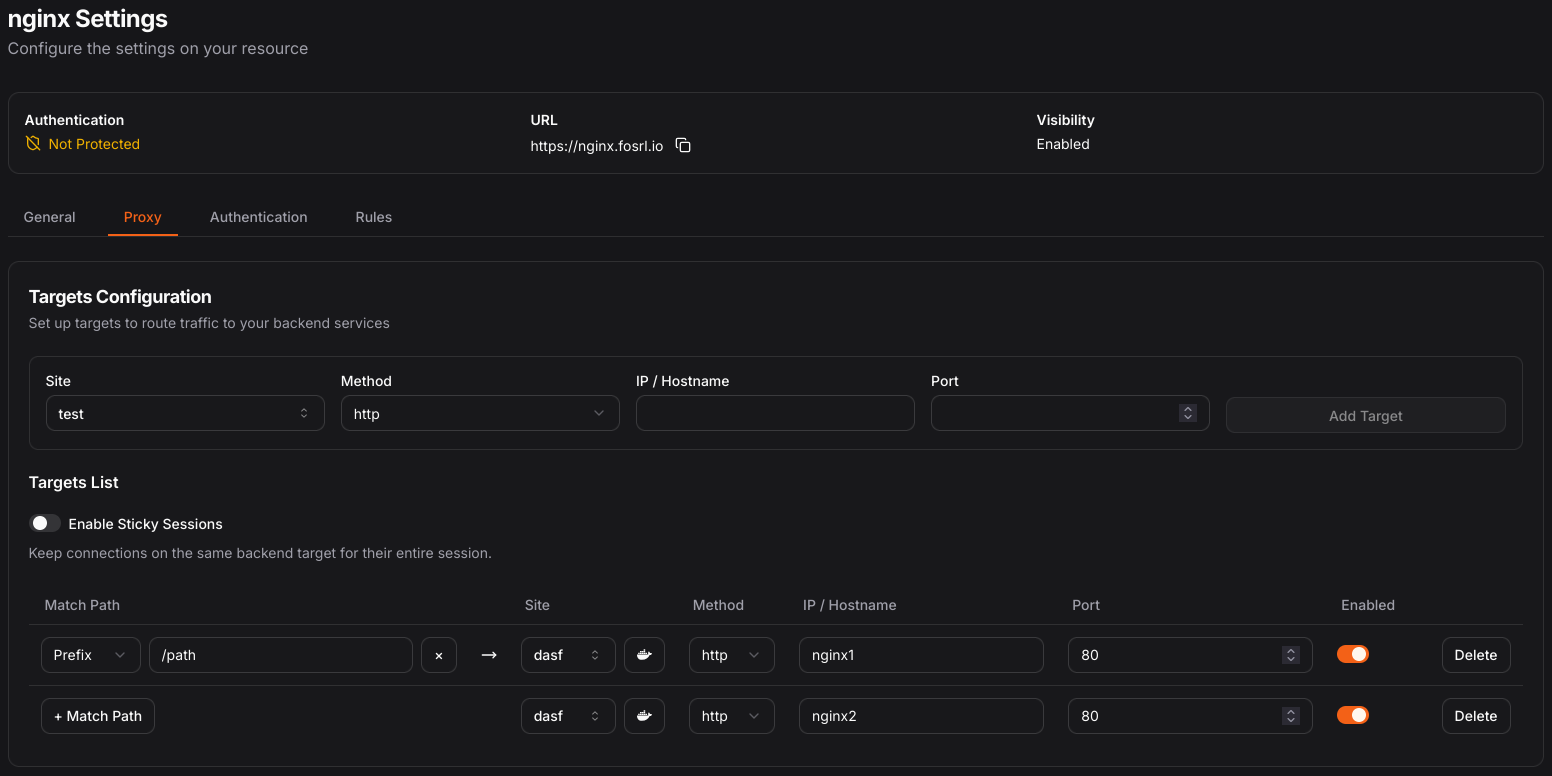
  nginx1:
    image: nginxdemos/hello
    container_name: nginx1
    labels:
      - pangolin.public-resources.nginx.name=nginx
      - pangolin.public-resources.nginx.full-domain=nginx.fosrl.io
      - pangolin.public-resources.nginx.protocol=http
      - pangolin.public-resources.nginx.request-headers[0].name=X-Example-Header
      - pangolin.public-resources.nginx.request-headers[0].value=example-value
      - pangolin.public-resources.nginx.targets[0].method=http
      - pangolin.public-resources.nginx.targets[0].path=/path
      - pangolin.public-resources.nginx.targets[0].path-match=prefix

  nginx2:
    image: nginxdemos/hello
    container_name: nginx2
    labels:
      - pangolin.public-resources.nginx.targets[1].method=http
      - pangolin.public-resources.nginx.targets[1].hostname=nginx2
      - pangolin.public-resources.nginx.targets[1].port=80

networks:
  default:
    name: pangolin_default
This creates a single Pangolin resource with multiple targets:
Container Label Behavior
Automatic Discovery
If hostname or port are not set explicitly, Pangolin can detect them from the container configuration. The hostname typically defaults to the container name, and port detection is based on the container's expose configuration.
Site Assignment
If no site is specified on a target (public resource) or on a private resource, it is assigned to the site that applied the blueprint, whether through container labels or --blueprint-file.
Merged Configuration
Labels from multiple containers can be merged into one logical resource, which is useful when different containers contribute different targets.
Configuration Reference
Use this section when you need the full schema. The order below mirrors the blueprint structure rather than the dashboard UI.
Top-Level Object
public-resources:
  app:
    name: App
    mode: http
    full-domain: app.example.com
    targets:
      - hostname: app
        port: 80
        method: http

private-resources:
  ssh-host:
    name: SSH Host
    mode: host
    sites:
      - my-site
    destination: 192.168.1.10
    tcp-ports: "22"

public-policies:
  default-member:
    name: Default Member Policy
    sso: true
    apply-rules: false
    rules: []

sites:
  my-site:
    name: My Site
docker-socket-enabled: truePublic Resource Object (public-resources)
public-resources:
  web-app:
    name: Web App
    mode: http
    policy: default-member
    full-domain: app.example.com
    enabled: true
    labels:
      - production
    host-header: internal.example.local
    tls-server-name: internal.example.local
    request-headers:
      - name: X-Env
        value: prod
    response-headers:
      - name: Access-Control-Allow-Origin
        value: *
    rules:
      - action: allow
        match: country
        value: US
      - action: deny
        match: region
        value: 019
    auth:
      pincode: 123456
      sso-enabled: true
      whitelist-users:
        - admin@example.com
    maintenance:
      enabled: true
      type: automatic
    targets:
      - site: my-site
        hostname: app
        port: 8080
        method: http
        path: /
        path-match: prefix
        rewrite-path: /
        rewrite-match: prefix
        healthcheck:
          hostname: app
          port: 8080
path: /healthPrivate Resource Object (private-resources)
private-resources:
  internal-net:
    name: Internal Network
    mode: cidr
    sites:
      - my-site
    destination: 10.0.0.0/24
    enabled: true
    tcp-ports: "22,443"
    udp-ports: "53"
    disable-icmp: false
    alias: "*.internal.example.com"
    roles:
      - Member
    users:
      - user@example.com
    machines:
      - machine-id-1
    labels:
      - production

  internal-app:
    name: Internal App
    mode: http
    sites:
      - my-site
    destination: 10.0.0.5
    destination-port: 8080
    full-domain: app.internal.example.com
    ssl: true
    scheme: https
enabled: trueResource Policy Object (public-policies)
public-policies:
  default-member:
    name: Default Member Policy
    sso: true
    auto-login-idp: null
    sso-roles:
      - Member
    sso-users: []
    password: null
    pincode: null
    basic-auth: null
    email-whitelist-enabled: false
    whitelist-users:
      - "*@example.com"
    apply-rules: true
    rules:
      - action: allow
        match: country
        value: US
enabled: trueValidation Rules And Constraints
Core Rules
- A public resource can be targets-only. In that case it may contain only
targets, andnameplusmodeare not required. - For full public resources,
nameplus (modeor deprecatedprotocol) are required. - When mode/protocol is
http, the resource must havefull-domainand each target must includemethod. - When mode/protocol is
tcporudp, the resource must haveproxy-port, targets must not includemethod, andauthis not allowed. proxy-protocolandproxy-protocol-versionare only valid when mode/protocol istcp.- If
auth-daemon.modeisremote,auth-daemon.portis required. - In private resources,
destinationis required unlessmode: sshwith native auth-daemon mode,mode: inference, ormode: exit-node. full-domainvalues must be unique across public resources.proxy-portvalues must be unique per protocol withinpublic-resources. TCP3000and UDP3000can coexist, but two TCP resources cannot both use3000.aliasvalues must be unique across private resources in the blueprint.mode: inference(public or private) requiresfull-domain, must not havetargets, and is the only mode that may setai-providers.ai-budgetentries on a resource must each use a uniqueunit/periodcombination.
Common Validation Errors
"Admin role cannot be included in sso-roles"
Admin is reserved and cannot be used in auth.sso-roles.
"Duplicate 'full-domain' values found"
Every public HTTP resource must have its own unique full-domain.
"Duplicate 'proxy-port' values found in public-resources"
Two public resources with the same protocol cannot reuse the same proxy-port.
"When protocol is 'http', all targets must have a 'method' field"
Each HTTP target must specify http, https, or h2c.
"When protocol is 'tcp' or 'udp', targets must not have a 'method' field"
Raw targets do not use HTTP methods.
"When protocol is 'tcp' or 'udp', 'auth' must not be provided"
Authentication settings apply only to HTTP public resources.
"'proxy-protocol' and 'proxy-protocol-version' can only be set when mode is 'tcp'"
Only TCP public resources can define proxy protocol behavior.
"port is required when auth-daemon mode is 'remote'"
Set auth-daemon.port whenever auth-daemon.mode: remote is used.
"destination is required unless mode is 'ssh' with auth-daemon mode 'native', 'inference', or 'gateway'"
Private resources need a destination except for SSH resources using native auth-daemon mode, inference resources, and exit-node (gateway) resources.
"Resource must either be targets-only or have both 'name' and 'protocol' fields"
Provide both fields for a full public resource definition, or remove everything except targets.
"Duplicate 'alias' values found in private-resources"
Private resource aliases must be unique within the blueprint.
"Destination must be a valid IP address or valid domain AND alias is required"
In host mode, the destination must be a valid host or IP. If you use a domain, provide alias as well.
"Destination must be a valid CIDR notation for cidr mode"
In cidr mode, destination must be a valid CIDR block such as 10.0.0.0/24.
"Admin role cannot be included in roles"
Admin is reserved and cannot be used in private resource roles.
"'ai-providers' can only be set when mode is 'inference'"
ai-providers is only valid on public or private resources with mode: inference.
"When mode is 'inference', 'targets' must not be provided"
Public resources with mode: inference proxy to ai-providers and cannot also define targets.
"'ai-budget' entries must not overlap: only one budget per unit/period combination is allowed"
Each entry in ai-budget must use a distinct unit/period pair, such as one usd/monthly budget and one tokens/daily budget on the same resource.
"'models' can only be set on a provider with access-mode 'select'"
Set models only when the ai-providers entry uses access-mode: select. Entries using access-mode: inherit must leave models empty.
Was this page helpful?