

Install Sites
Install the site connector as a binary or Docker container
The site connector can be installed as either a static binary executable or a Docker container via the CLI. You must first create a site and copy the ID and secret config from Pangolin before running it.
The Pangolin CLI is the recommended way to install a new site. Existing Newt deployments keep working. For Newt-specific install commands, see Install Newt.
Binary Installation (Linux, macOS, Windows)
Install
Use this command to automatically install the CLI. It detects your system architecture automatically and always pulls the latest version, adding the CLI to your PATH:
curl -fsSL https://static.pangolin.net/get-cli.sh | bashTo run a site on Windows, download the latest installer.
Binaries for Linux, macOS, and Windows are available in the GitHub releases for ARM and AMD64 (x86_64) architectures.
Running the Site
Run the site connector with the configuration from Pangolin:
pangolin up site \
--id 31frd0uzbjvp721 \
--secret h51mmlknrvrwv8s4r1i210azhumt6isgbpyavxodibx1k2d6 \
--endpoint https://app.pangolin.net
Run as a Service
The CLI can install and manage a service on your host machine for you. This supports Windows services, MacOS's launchd, and Linux's systemd to create a persistent site connection from that host.
sudo pangolin service install site \
--id 31frd0uzbjvp721 \
--secret h51mmlknrvrwv8s4r1i210azhumt6isgbpyavxodibx1k2d6 \
--endpoint https://app.pangolin.net
Check the service status:
sudo pangolin service status siteAnd to get the logs:
sudo pangolin service logs siteManual Systemd Service
Create /etc/pangolin/pangolin-site.env with the initial values from your Pangolin site configuration:
SITE_ID=31frd0uzbjvp721
SITE_SECRET=h51mmlknrvrwv8s4r1i210azhumt6isgbpyavxodibx1k2d6
PANGOLIN_ENDPOINT=https://app.pangolin.net
Create the directory, write the file, and restrict its permissions:
sudo install -d -m 0755 /etc/pangolin
sudo editor /etc/pangolin/pangolin-site.env
sudo chmod 600 /etc/pangolin/pangolin-site.env
Then create a systemd service. The site connector reads those environment variables automatically, so ExecStart does not need to repeat them as flags:
[Unit]
Description=Pangolin Site
Wants=network-online.target
After=network-online.target

[Service]
Type=simple
User=root
Group=root
EnvironmentFile=/etc/pangolin/pangolin-site.env
ExecStart=/usr/local/bin/pangolin up site
Restart=always
RestartSec=2
UMask=0077

PrivateTmp=true

[Install]
WantedBy=multi-user.target
Make sure the binary exists at /usr/local/bin/pangolin before daemon reload and starting the service: ~$ which pangolin
Reload systemd and enable the service:
sudo systemctl daemon-reload
sudo systemctl enable --now pangolin-site
sudo systemctl status pangolin-site
If you later change /etc/pangolin/pangolin-site.env, restart the service so the site connector picks up the new values.
See Configure Sites for more environment variables.
Docker Installation
Pull the Image
Pull the latest image from Docker Hub:
docker pull fosrl/pangolin-cli:latestRun with Docker
Run the site connector with CLI arguments from Pangolin:
docker run -dit --network host fosrl/pangolin-cli up site --id 31frd0uzbjvp721 \
--secret h51mmlknrvrwv8s4r1i210azhumt6isgbpyavxodibx1k2d6 \
--endpoint https://app.pangolin.net
Docker Compose
Environment Variables (Recommended)
services:
  pangolin-site:
    image: fosrl/pangolin-cli
    container_name: pangolin-site
    restart: unless-stopped
    environment:
      - PANGOLIN_ENDPOINT=https://app.pangolin.net
      - SITE_ID=2ix2t8xk22ubpfy
      - SITE_SECRET=nnisrfsdfc7prqsp9ewo1dvtvci50j5uiqotez00dgap0ii2
Config File Injected as Compose Secret
A safer but slightly more complex way is to use Compose Secrets. First, create a JSON file containing your configuration:
{
  "id": "2ix2t8xk22ubpfy",
  "secret": "nnisrfsdfc7prqsp9ewo1dvtvci50j5uiqotez00dgap0ii2",
  "endpoint": "https://app.pangolin.net"
}
Then register and reference the secret in your docker-compose.yml:
services:
  pangolin-site:
    image: fosrl/pangolin-cli
    container_name: pangolin-site
    restart: unless-stopped
    command:
      - up
      - site
    environment:
      - CONFIG_FILE=/run/secrets/pangolin-site-config
    secrets:
      - pangolin-site-config

secrets:
  pangolin-site-config:
    file: ./pangolin-site-config.secret
This allows you to separate sensitive secrets from plain configuration, improving security when storing or sharing your docker-compose.yml anywhere else.
CLI Arguments
services:
  pangolin-site:
    image: fosrl/pangolin-cli
    container_name: pangolin-site
    restart: unless-stopped
    command:
      - up
      - site
      - --id 31frd0uzbjvp721
      - --secret h51mmlknrvrwv8s4r1i210azhumt6isgbpyavxodibx1k2d6
      - --endpoint https://app.pangolin.net
Docker Healthcheck
The site connector supports healthchecks as described in Configure Sites. This file can be used to do a healthcheck from within docker (compose file).
We need to define the HEALTH_FILE environment variable as well as the healthcheck itself:
    environment:
      - HEALTH_FILE=/tmp/healthy
    healthcheck:
      test: ["CMD-SHELL", "[ -f /tmp/healthy ]"]
      interval: 30s
      timeout: 5s
      start_period: 30s
      retries: 3
Start the service:
docker compose up -dPlatform-Specific Installation
Unraid
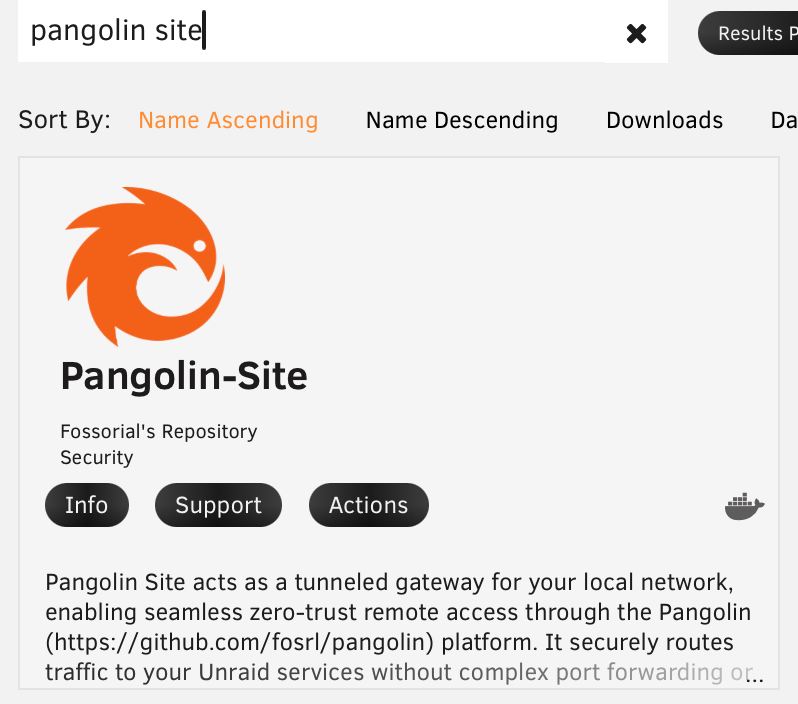
Pangolin Site is available in the Unraid Community Applications store. This template runs the Pangolin CLI (fosrl/pangolin-cli) and is the recommended way to install a site on Unraid. Use it instead of the Newt Community Applications listing for new sites.
Search for Pangolin Site and install the listing from Fossorial's Repository. That is the officially supported template.
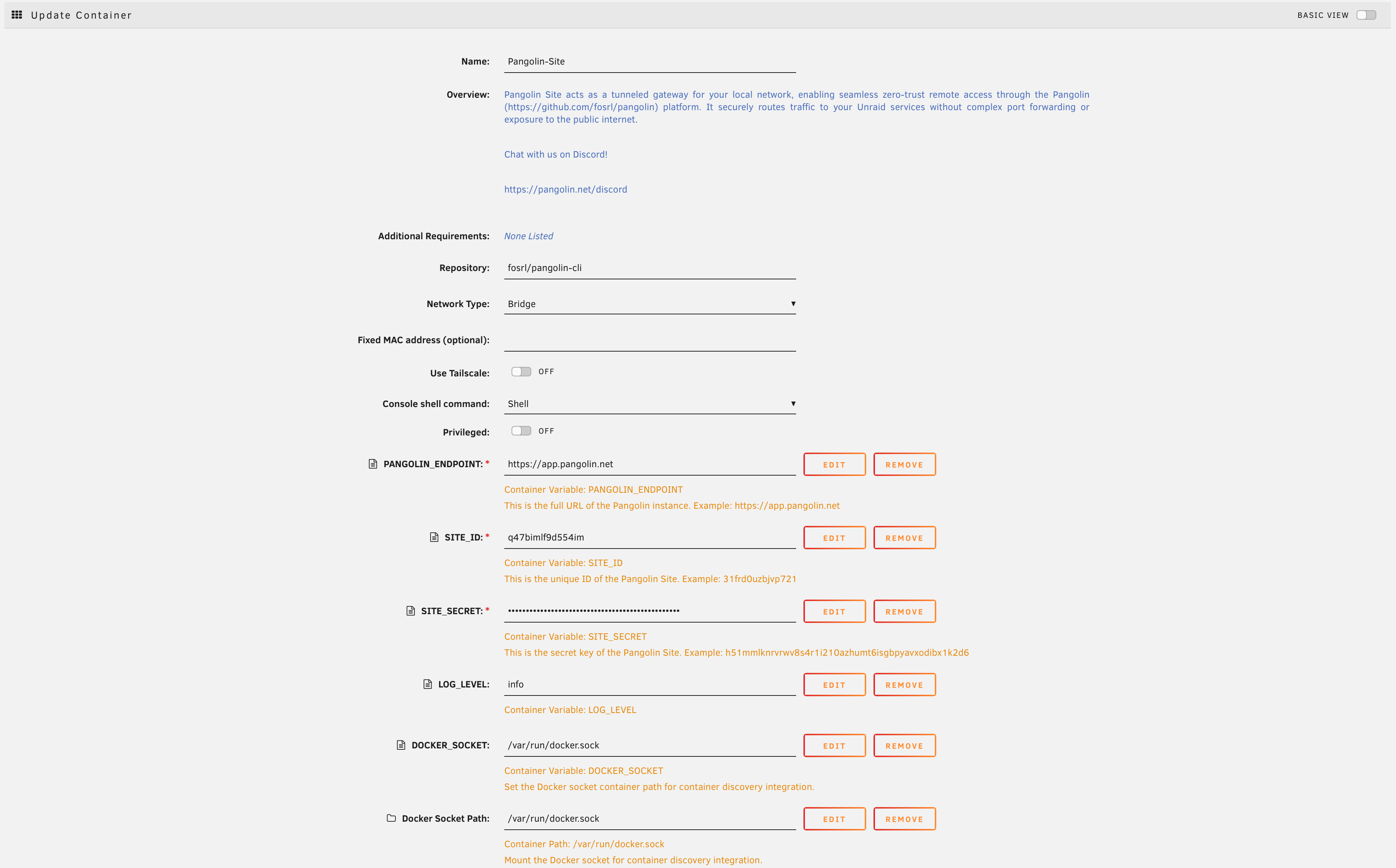
Follow the installation prompts, then enter the site ID, secret, and endpoint from Pangolin in the template fields.
Kubernetes
The Kubernetes install still uses the legacy Newt for the Helm chart, namespace, and secret keys shown below.
Running a site in a Kubernetes cluster is covered separately from the Docker instructions above, since it uses a dedicated Helm chart rather than a plain docker run or Compose file. See:
Newt
Advantech routers, Windows services, and other Newt-only install methods are documented on Install Newt. Use Newt when you want the smaller standalone connector instead of the Pangolin CLI.
Was this page helpful?