

Alert Rules
Subscribe to Pangolin events on sites, resources, and health checks and deliver email, webhooks, or integrations
Only available in Pangolin Cloud and Enterprise Edition.
Alert rules let you react to changes in Pangolin: you pick a source (what to watch), a trigger (which change matters), and one or more actions (what to do). For example, when a site moves from online to offline, email your admins and support; when a health check or resource becomes unhealthy, call a webhook so a tool like Zapier can fan out the event.
Benefits
- Find out about outages as they happen instead of from users.
- Send alerts where your team already works: email, webhooks, or PagerDuty, Opsgenie, ServiceNow, and incident.io.
- One rule can watch every site or resource, or only the ones you pick.
- Health checks run from your sites, so alerts reflect what is reachable on the remote network.
Use cases
- Page on-call when a production site goes offline.
- Email a branch office's IT contact when their site connector drops.
- Open an incident when a public resource's targets all become unhealthy.
- Watch printers, cameras, or legacy servers with arbitrary health checks and alert when they stop responding.
- Send events to a webhook to post in chat or trigger automation.
How alert rules work
Each rule has three parts:
- A source: the sites, resources, or health checks to watch.
- A trigger: the state change that matters, such as going offline or becoming unhealthy.
- One or more actions: what Pangolin does when the trigger fires.
When a watched entity changes state and matches the trigger, Pangolin runs every action on the rule.
Where to create rules
Create and manage rules from the Alert rules page under Alerting for your organization.
You can also start a rule from a site or resource detail page: use Create alert rule near the uptime graph to prefill context and keep the flow short.
Actions
When a trigger fires, Pangolin can:
- Send email (recipients described below).
- Call a webhook with a JSON payload (see Webhook payloads).
- Open an incident or ticket in PagerDuty, Opsgenie, ServiceNow, or incident.io.
You can attach several actions to the same rule (for example email plus a webhook).
Choose users in your Pangolin organization, entire roles, and/or arbitrary email addresses that should receive the message when the condition is met.
Webhooks
Webhook actions issue an HTTP request to your endpoint when the trigger runs. Payloads are JSON and follow the shapes in Webhook payloads.
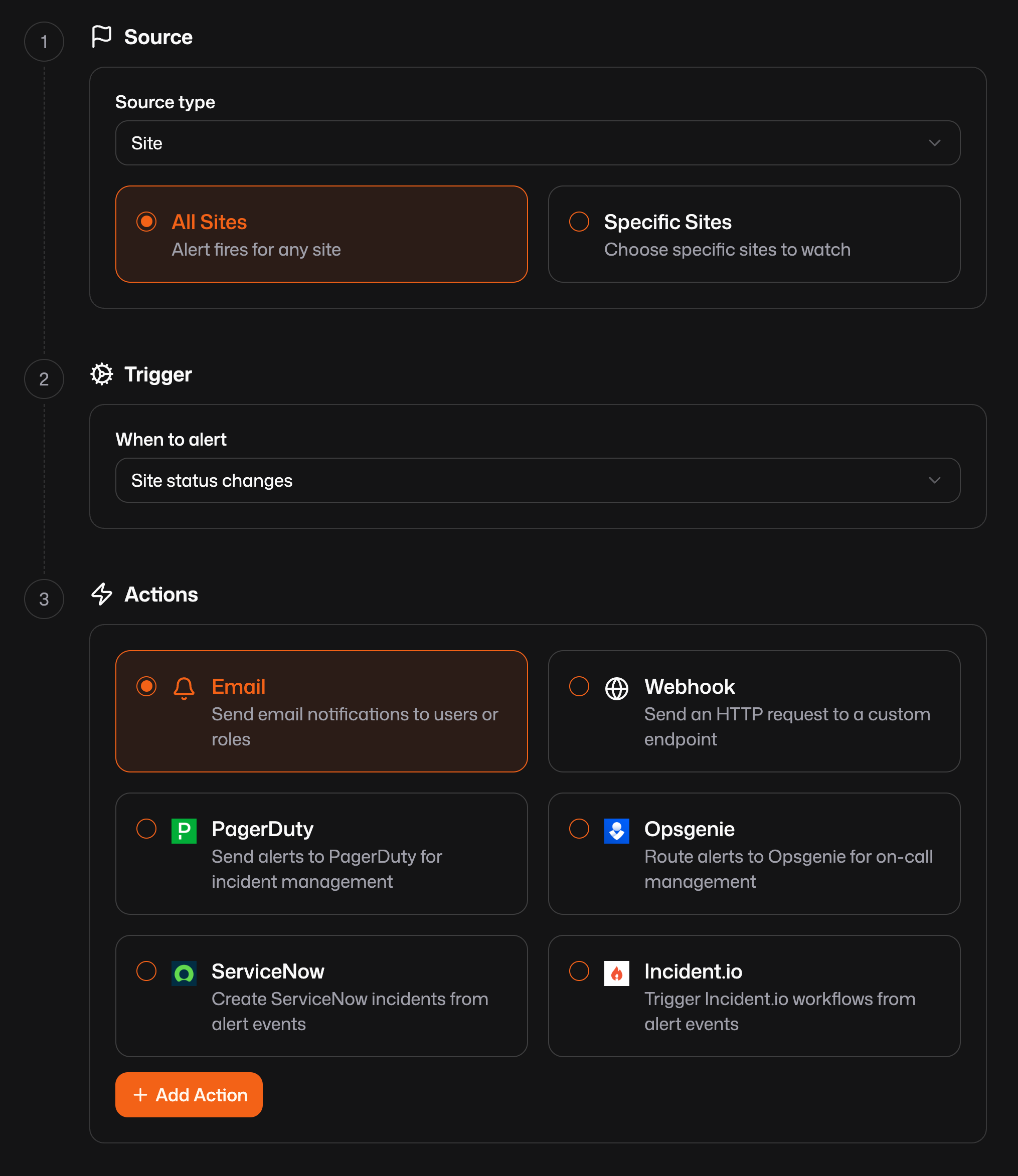
Creating an alert rule
1. Source
Choose what entity the rule watches:
| Source type | Meaning |
|---|---|
| Site | One or more sites |
| Resource | One or more resources in the org |
| Health check | One or more health checks |
For each type, decide whether the rule applies to all of that kind (for example all sites) or only specific sites, resources, or health checks you select.
2. Trigger
Available triggers depend on the source type. For sites, options include coming online, going offline, or any status change. For resources and health checks, you get healthy, unhealthy, and combined toggle-style triggers that match how those entities change state-the dashboard only lists combinations that apply to what you selected.
Pick the condition that should fire the rule (for example site status changes when you care about both online and offline transitions).
3. Actions
Configure what happens when the trigger runs: add one or more actions (email, webhook, or a vendor integration). Use Add action to stack multiple destinations for the same rule.
Webhook payloads
Webhook bodies are JSON. Every event includes event, ISO-8601 timestamp, and a data object. The event name tells you what changed; data always includes orgId and entity-specific fields.
{{data}} is an object and must be treated as such. If you can not support a object, you can also use the flattened fields shown in the examples below. For example {{orgId}}, {{siteId}}, and {{siteName}} are all available on a site alert.
Site events
site_online
A site came back online.
{
  "event": "site_online",
  "timestamp": "2025-06-15T12:34:56.789Z",
  "data": {
    "orgId": "org_abc123",
    "siteId": 42,
    "siteName": "us-east-prod"
  }
}
site_offline
A site went offline.
{
  "event": "site_offline",
  "timestamp": "2025-06-15T12:34:56.789Z",
  "data": {
    "orgId": "org_abc123",
    "siteId": 42,
    "siteName": "us-east-prod"
  }
}
site_toggle
Fires when site connectivity changes, alongside both site_online and site_offline. Use this when you only care that status flipped, not which direction. siteId is always present in data.
{
  "event": "site_toggle",
  "timestamp": "2025-06-15T12:34:56.789Z",
  "data": {
    "orgId": "org_abc123",
    "siteId": 42,
    "siteName": "us-east-prod"
  }
}
Health check events
health_check_healthy
A health check recovered.
{
  "event": "health_check_healthy",
  "timestamp": "2025-06-15T12:34:56.789Z",
  "data": {
    "orgId": "org_abc123",
    "healthCheckName": "API /healthz"
  }
}
health_check_unhealthy
A health check is failing.
{
  "event": "health_check_unhealthy",
  "timestamp": "2025-06-15T12:34:56.789Z",
  "data": {
    "orgId": "org_abc123",
    "healthCheckName": "API /healthz"
  }
}
health_check_toggle
Fires alongside healthy and unhealthy transitions. healthCheckId is included in data for this combined event.
{
  "event": "health_check_toggle",
  "timestamp": "2025-06-15T12:34:56.789Z",
  "data": {
    "orgId": "org_abc123",
    "healthCheckId": 7,
    "healthCheckName": "API /healthz"
  }
}
Resource events
resource_healthy
A resource recovered.
{
  "event": "resource_healthy",
  "timestamp": "2025-06-15T12:34:56.789Z",
  "data": {
    "orgId": "org_abc123",
    "resourceName": "internal-dashboard"
  }
}
resource_unhealthy
A resource is unhealthy.
{
  "event": "resource_unhealthy",
  "timestamp": "2025-06-15T12:34:56.789Z",
  "data": {
    "orgId": "org_abc123",
    "resourceName": "internal-dashboard"
  }
}
resource_toggle
Fires alongside healthy and unhealthy transitions, or when a resource is enabled or disabled. resourceId is included in data.
{
  "event": "resource_toggle",
  "timestamp": "2025-06-15T12:34:56.789Z",
  "data": {
    "orgId": "org_abc123",
    "resourceId": 15,
    "resourceName": "internal-dashboard"
  }
}Was this page helpful?