

NAT Traversal
How clients connect on the same network, hole punch through NAT, or relay through Pangolin
When a client connects to a site, Pangolin tries to establish the most direct path possible. If the client and site are on the same local network, they form a direct peer-to-peer connection on that network. Otherwise, the client attempts NAT hole punching before falling back to relaying.
Same Network Detection
When a client and site share the same local network, they detect this and connect peer-to-peer over the LAN. Packets stay on the local network and are not routed out through the internet or your Pangolin server. The connection does not use the relay path when both peers are on the same network.
Same-network connections typically offer the lowest latency because traffic never leaves the LAN.
The site collects IP addresses from the host's network interfaces and uses them to send UDP test packets to the client. If the site runs inside a Docker container, it only sees the container's internal network, so run it on the host itself to ensure it can detect the host's real IP addresses. This detection also works across VLANs. If a client and site are on different VLANs but routing between them is configured correctly, the connection should still succeed.
NAT Hole Punching
NAT hole punching establishes a direct peer-to-peer connection between the client and site, bypassing the need to route traffic through the Pangolin server. The server coordinates the initial connection by helping both peers discover each other's network addresses, allowing them to establish a direct tunnel through their respective NATs and firewalls.
For a deeper look at how Pangolin coordinates hole punching between clients and sites, see NAT Hole Punching in Pangolin.
Direct connections typically offer:
- Better performance (speed and bandwidth)
- Lower VPS transit costs when you self-host
Relaying
If the site and client are unable to hole punch, they fall back to relaying through your Pangolin server.
Clients can relay traffic through a Pangolin server, through the Gerbil service specifically. Gerbil listens on UDP port 21820 for new WireGuard connections and forwards the packets down the site tunnels to the right peers. This means your connections back to your site do not require firewall config and uses the existing NAT hole punching capabilities of the site.
Relaying is reliable when direct paths are blocked by NAT or firewall rules, but traffic passes through your Pangolin node instead of traveling directly between the client and site.
If you use Pangolin Cloud and want relayed traffic to stay on infrastructure you control, self-host a remote node. Relayed client traffic then traverses your node rather than Pangolin's shared cloud infrastructure.
Check Whether a Site Is Relayed
You can confirm whether a connection is direct or relayed from the client. GUI clients and the CLI both report a connection value:
Direct: hole-punched connection to the siteRelay: traffic is relayed through your Pangolin serverLocal: the site is on the same local network as the client
GUI clients
In a GUI client (Mac, Windows, Android, or iOS/iPadOS), open Preferences and go to the Status tab. The formatted view lists each site and its status. Click a site to open its details and read Connection.
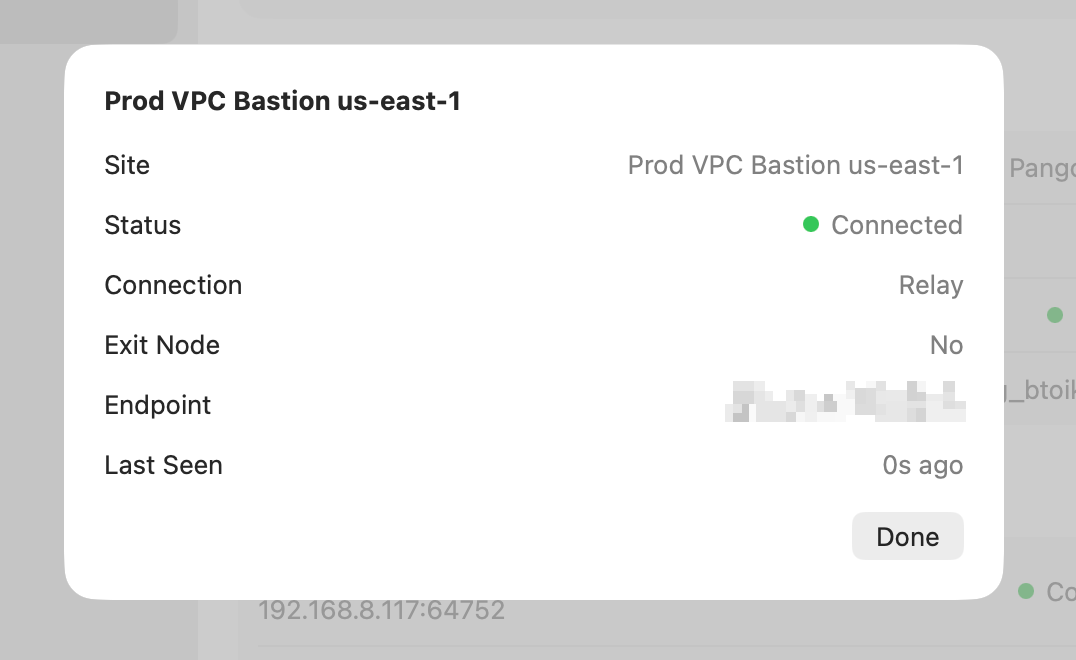
In this example, Prod VPC Bastion us-east-1 is connected through the relay.
CLI
On Linux or when using Pangolin CLI, run pangolin status. The CONNECTION column shows the same value for each site:
pangolin status
AGENT         VERSION  STATUS     ORG
Pangolin CLI  0.10.1   Connected  org_example123

SITE            ENDPOINT               STATUS     LAST SEEN  CONNECTION
Office Network  203.0.113.10:51820     Connected  1s ago     Direct
Remote Lab      198.51.100.5:21820     Connected  1s ago     Relay
Worklab Lab     192.168.1.33:23423     Connected  1s ago     Local
Use either view when troubleshooting hole punching or verifying that configuration changes took effect.
Improve Hole Punching Reliability
Pangolin Sites support NAT traversal so clients can connect directly without relaying through the Pangolin server, improving performance and reducing latency.
In some environments, depending on the NAT type and firewall, you may need to tweak settings to get optimal connectivity in the firewall itself. See Firewall Integrations for Pangolin-specific guidance for common platforms.
Another option is to keep the Pangolin Site listening for client connections on a static port. This allows you to open a specific port in your firewall for Pangolin Site client connections instead of random high ports. You can do this by setting the --port flag or PORT environment variable and then opening this port in your firewall to DNAT to the Pangolin Site. See Configure Sites for the full list of Pangolin Site flags and environment variables.
FAQ
What happens when the client and site are on the same network?
The client and site detect that they share a local network and form a direct peer-to-peer connection on the LAN. Packets are not routed out of the network, and the connection does not use the relay path.
Why is my connection relayed instead of direct?
Hole punching can fail when either side sits behind a restrictive NAT, symmetric NAT, or a firewall that blocks the UDP ports needed for peer discovery. When that happens, the client and site fall back to relaying through your Pangolin server so the tunnel still comes up reliably.
How do I check whether a site is relayed?
GUI clients: Open Preferences, go to the Status tab, and click a site. Connection is Relay when the site is relayed, and Direct or Local when the path is direct.
CLI: Run pangolin status and check the CONNECTION column for each site.
See Check Whether a Site Is Relayed for examples.
Is relayed traffic still encrypted?
Yes. Whether the path is direct or relayed, client-to-site traffic is encrypted over WireGuard. Relaying changes the network path, not the encryption of the tunnel itself.
Will relaying affect performance?
Direct hole-punched connections usually offer lower latency and higher throughput because traffic does not pass through your Pangolin node. Relayed connections add an extra hop through Gerbil, which can increase latency and bandwidth use on the node—especially relevant if you self-host and pay for transit.
Can I force direct connections only?
You can disable relaying with disable-relay in the client config or --disable-relay / DISABLE_RELAY=true on CLI clients. If hole punching fails, the client will not fall back to a relay and the site may not connect. See Olm for details.
Can I always relay and skip hole punching?
Yes. Set disable-holepunch in the client config or use --disable-holepunch / DISABLE_HOLEPUNCH=true on CLI clients to skip hole punching and connect through the relay path. See Olm for details.
Does relayed traffic go through Pangolin Cloud?
On self-hosted Pangolin, relayed traffic passes through your own Gerbil instance. On Pangolin Cloud, relayed traffic may traverse Pangolin's shared infrastructure unless you self-host a remote node, in which case relayed client traffic uses your node instead.
Do I need to open firewall ports for hole punching?
Not always. Many networks hole punch successfully without inbound rules. If punching is unreliable, try Firewall Integrations guidance or pin the Pangolin Site to a static port with --port / PORT and DNAT that port to the Pangolin Site host.
Was this page helpful?