

Site Provisioning Keys
Use long-lived provisioning tokens to bootstrap Pangolin sites at scale without pre-creating ID-secret pairs for every host
Why provisioning keys exist
As described in Site credentials, each Pangolin site authenticates with an ID and secret (random strings you get when a site is first created) plus an endpoint pointing at your Pangolin server. That model is simple for a handful of sites, but it breaks down quickly when you must issue and distribute unique credentials for many machines.
IoT and edge fleets are the classic case: hundreds or thousands of devices each need their own site identity. Before provisioning keys, you typically scripted against the API to mint an ID-secret pair per device, then pushed those secrets through your device-management or OTA layer so each unit could connect. That works, but it multiplies secret-handling paths and makes rotation and auditing harder.
The same friction shows up in other scenarios:
- Golden images and OS images: You want one trusted image (or cloud-init payload) shared across a class of machines, not a unique secret baked into every build artifact. A single provisioning key in the image, or injected at first boot, lets each instance obtain its own credentials the first time the site starts.
- Scripted and CI-driven installs: Ansible, Terraform, cloud-init, or installer scripts can drop the same provisioning key everywhere (or fetch it from a vault once) instead of coordinating “create site N, copy credentials to host N” for every node.
- Developer and lab environments: Spin up VMs or containers repeatedly without clicking through the dashboard for each site; tear them down and provision again with bounded keys (usage limits and expiry; see below).
- MSP and multi-customer rollouts: Standardize your onboarding bundle (endpoint + provisioning key + blueprint) while still giving each customer site isolated credentials after exchange.
With provisioning keys, you create one long-lived token in Pangolin, embed it in your image or distribute it with a single script, and each site exchanges that token for its own site ID and secret on first connect.
How provisioning works
You can supply the provisioning key in either of two ways:
1. Config file
Put the key in a JSON config file in a provisioningKey field (the value is the key string from Pangolin, often shown with an spk prefix) and point the site at that file:
pangolin up site --config-file /var/site.json{
"endpoint": "https://app.pangolin.net",
"provisioningKey": "spk_..."
}2. Command line
Pass the key with --provisioning-key instead of storing it in the file. You still use --config-file so the site has a path to write and persist settings; see Configure Sites for the rest):
pangolin up site --config-file /var/site.json --endpoint https://app.pangolin.net --provisioning-key 'spk_...'After the site is provisioned, the site writes the new id and secret into that config file. On later runs, the site uses those credentials and ignores the provisioning key (CLI flag or file field), because valid ID and secret are already present. If you used provisioningKey in JSON, that entry is removed when the file is updated, so the long-lived token is not left on disk. If you pass --provisioning-key instead, the site does not write that key into the config file, but anything that launched the site with the flag may still contain it.
From there the site authenticates over the websocket, optionally applies a blueprint if you passed one, then brings the tunnel online. The high-level sequence is summarized below.
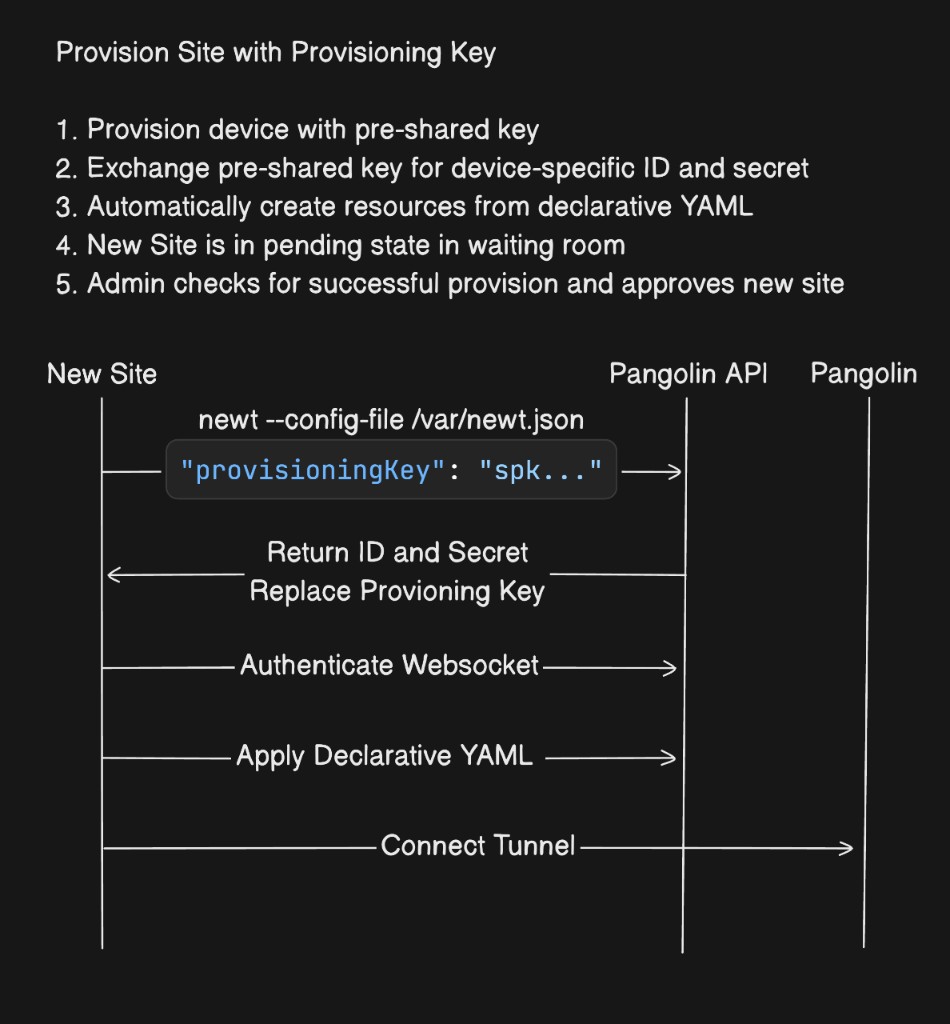
Pangolin Blueprints are not required when using provisioning keys. You can provision with the key only and manage resources in the dashboard afterward. Blueprints are optional but convenient when you want resources and settings created automatically from YAML as soon as the site connects.
--provisioning-blueprint-file vs --blueprint-file
When you run a site with a provisioning key, you can attach a blueprint YAML file in two different ways:
| Flag | Behavior |
|---|---|
--blueprint-file | Declarative. The blueprint is the ongoing source of truth. The site keeps applying it, and changes you make in the dashboard can be overwritten the next time the blueprint is applied. |
--provisioning-blueprint-file | Imperative (bootstrap only). The file is applied once, at provisioning time. After that, the site does not keep reapplying it. You can edit resources in the dashboard and those edits will not be overridden by that YAML on later runs. |
Use --provisioning-blueprint-file when you want automation to create an initial set of resources (for example from a fleet template) but you intend to manage or tune them in the UI afterward. Use --blueprint-file when you want the file to remain authoritative, the same as on a normal site without provisioning keys.
pangolin up site --config-file /var/site.json --provisioning-blueprint-file /path/to/bootstrap.yamlIf you do use blueprints together with provisioning keys, you get a repeatable pattern for large fleets: one key (with appropriate limits), a blueprint file, and optional environment-specific values so each host gets distinct resource names or domains without maintaining separate YAML per device. Pick the flag above based on whether that YAML should keep governing the site or only run at first connect.
Blueprint example and environment templating
Blueprints can reference environment variables using {{env.VARIABLE_NAME}} syntax. At apply time, those placeholders are filled from the process environment running the site (for example a serial number, hostname, or customer slug exported before start). That lets one blueprint drive many sites: each host sets SERIAL_NUMBER, CUSTOMER_ID, or similar, and the resolved YAML defines unique site names, domains, or role assignments.
Below, {{env.SERIAL_NUMBER}} ties the private resource’s site field and the public resource’s hostname to the same per-device identity:
private-resources:
  ssh-resource:
    name: SSH Server
    mode: host
    destination: localhost
    site: "{{env.SERIAL_NUMBER}}-site"
    tcp-ports: "22,3389"
    udp-ports: "*"
    disable-icmp: false
    roles:
      - Customer1
      - DevOps
    users:
      - user@example.com
public-resources:
  secure-resource:
    name: Web Resource
    protocol: http
    full-domain: "{{env.SERIAL_NUMBER}}.example.com"
    auth:
      sso-enabled: true
      sso-roles:
        - Member
        - Admin
      sso-users:
        - user@example.com
Use whatever variables match your deployment (for example asset tags or cloud instance IDs). Ensure those variables are set in the environment where the site runs before it applies the blueprint. For more on blueprint structure and applying YAML from a site, see the Blueprints documentation.
Optional site name (--name)
You can pass --name to the site when provisioning so the new site gets a specific name. The value supports the same {{env.VARIABLE_NAME}} templating as blueprints: placeholders are expanded from the environment where the site runs before the site is created (for example per-device serials or hostnames).
pangolin up site --config-file /var/site.json --name '{{env.SERIAL_NUMBER}}-edge'If you omit --name, Pangolin assigns a random animal-based name, which you can change later in the dashboard. Explicit or templated names help when your automation or blueprint references the site by a stable label.
Limits, expiry, and security model
Provisioning keys support a maximum usage count and an expiration time. For example, to roll out 250 devices over a week, set max usage to 250 and expiry to one week. When either limit is reached, the key becomes inactive and the server rejects further exchange attempts.
Provisioning keys are not API keys. They cannot authorize arbitrary Pangolin API calls; they exist only to bootstrap sites through the provisioning exchange.
Creating a key and pending approval
In the Pangolin admin UI, create a provisioning key from the provisioning settings (including usage and expiration as needed). The flow is illustrated below.
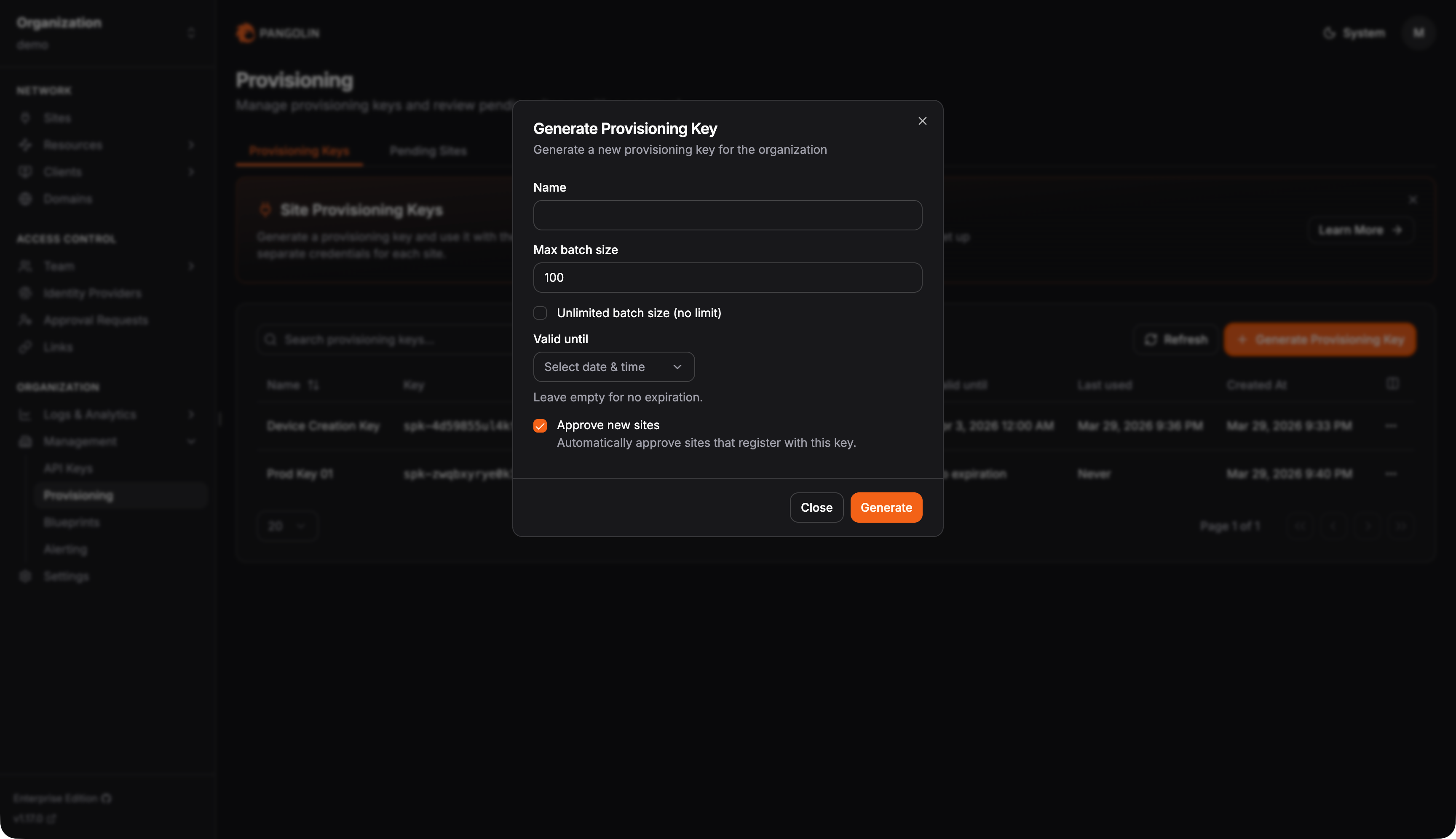
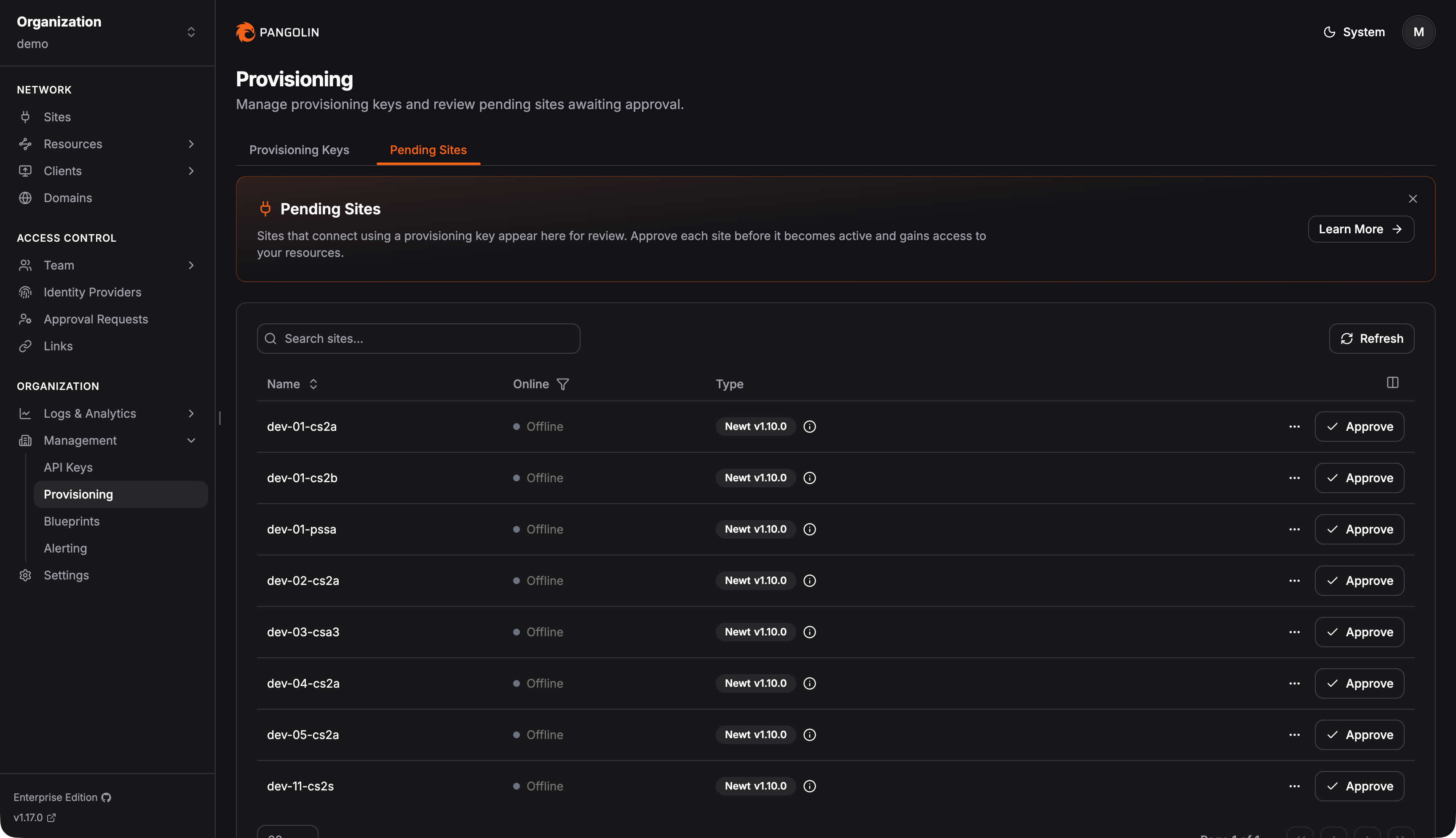
Optionally, sites provisioned with a key can be placed into a pending state. They appear under the Pending Sites tab on the provisioning page so administrators can review new sites and approve them before they are treated as fully active in production.
When a site is pending, any resources created for that site from a blueprint are pending as well. Pending resources are hidden from the main resources table and disabled by default, so end users cannot access them. That keeps the provisioned site and its blueprint resources in a staging setup until an admin confirms everything looks correct.
Admins can still inspect pending resources from the site: open Resources on the site row in the sites table, or go to the site’s edit page. Pending resources can be edited like any other resource. You can review configuration, enable a resource temporarily, and connect to verify that access works before promoting the site.
Approving a pending site marks all of its associated pending resources as not pending and enables them, moving the staged setup into production. Rejecting a pending site deletes all associated pending resources along with the site.
Was this page helpful?