

Clustering is only available in Enterprise Edition. Please reach out to us to deploy.
Overview
For organizations requiring maximum uptime and performance, Pangolin supports clustered deployments where multiple server instances work together as a unified system. This architecture enables regional distribution, automatic failover, and horizontal scaling to handle demanding production workloads. In a clustered configuration, multiple Pangolin server instances operate together, sharing state through a PostgreSQL database and Valkey server. Each instance can independently serve user requests, manage authentication, and coordinate with Gerbil instances to support thousands of sites across your organization.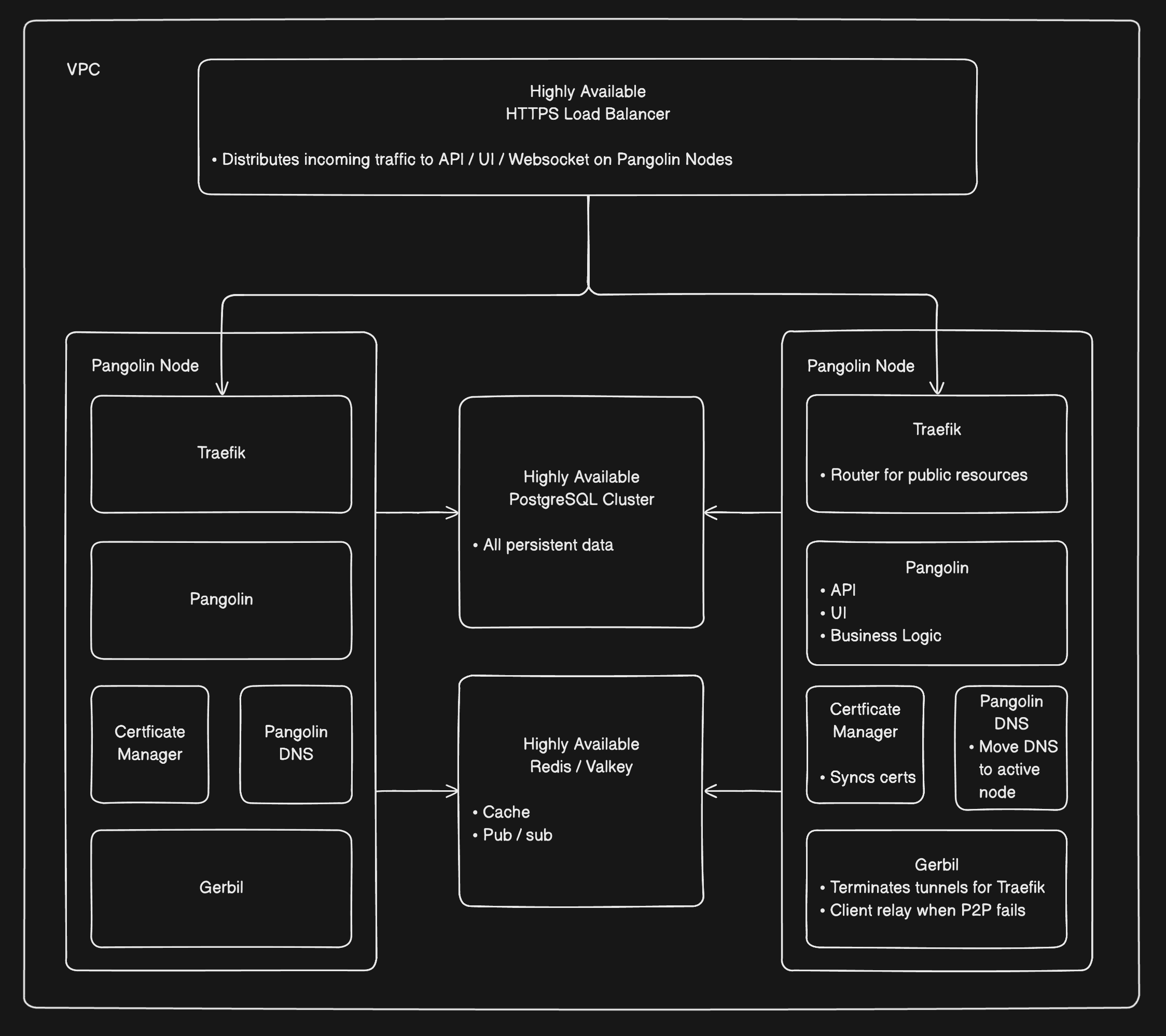
Pangolin clsuter diagram with two nodes
Architecture Components
A Pangolin cluster consists of several coordinated components that work together to provide high availability and seamless failover. Each component plays a specific role in ensuring your deployment remains online and performant.Pangolin Instances
Purpose: Serve the web UI, API, and manage cluster coordination. How It Works:- Multiple Pangolin instances run simultaneously across different nodes
- Each instance can independently handle user authentication and requests
- All instances share state through the PostgreSQL database and Valkey
- Instances coordinate to manage site configurations, resources, and access policies
DNS Servers
Purpose: Provide dynamic DNS resolution for certificate generation and failover management. How It Works:- Each cluster node runs a DNS server in the same Docker stack as Pangolin
- DNS servers listen on port 53 UDP and serve DNS records for cluster resources
- You must create NS (name server) records in your domain provider pointing to each DNS instance
- You must delegate domains for resources to these name servers
- Multiple DNS instances prevent single points of failure
- Host ACME challenge tokens for Let’s Encrypt certificate generation
- Automatically update DNS records when sites move between nodes
- Redirect traffic to healthy nodes when a node fails
- Enable failover by pointing resources to available instances
PostgreSQL Database
Purpose: Store all persistent cluster state in a centralized, shared database. How It Works:- All Pangolin instances connect to a shared PostgreSQL database
- Stores user accounts, site configurations, resources, access policies, and organizational settings
- Certificates are stored encrypted in the database for security
- Changes made through any instance are immediately available cluster-wide
Valkey (Redis)
Purpose: Provide real-time state synchronization between cluster nodes. How It Works:- Pub/sub messaging keeps nodes synchronized on ephemeral state
- Tracks active user sessions, WebSocket connections, and tunnel status
- When a user authenticates to one instance, all nodes become aware via Valkey
- Enables rapid failover by sharing connection state across the cluster
Certificate Generation Server
Purpose: Automate TLS certificate issuance and renewal for all cluster resources. How It Works:- Dedicated server communicates with Let’s Encrypt for certificate issuance
- Uses DNS-01 challenge validation through the cluster’s DNS servers
- Generates certificates and stores them encrypted in the PostgreSQL database
- Handles automatic certificate renewal across the entire cluster
Traefik Instances
Purpose: Route HTTP/HTTPS traffic to resources and terminate TLS connections. How It Works:- Each cluster node runs its own Traefik instance
- Pangolin writes configuration files and certificates to a shared volume with Traefik
- Each resource pulls its certificate from the database to files Traefik can read
- Traefik reads router configurations from local files to serve resources
- Sits behind Gerbil, which runs an SNI proxy for traffic routing
Gerbil Instances
Purpose: Manage WireGuard tunnels to site connectors and route traffic between cluster nodes. How It Works:- Each Pangolin instance runs alongside its own Gerbil tunnel manager
- Handles WireGuard VPN connections from site connectors
- Site connectors can establish tunnels to any available Gerbil instance
- All Gerbil instances are aware of other nodes in the network
- Routes incoming requests to the correct Gerbil instance to exit through the appropriate site
- When DNS caching causes traffic to hit the wrong node, Gerbil routes requests to the correct node
Load Balancer
Purpose: Distribute incoming traffic across healthy Pangolin instances. How It Works:- Sits in front of all Pangolin instances serving the UI and API
- Monitors instance health and routes traffic only to available nodes
- Ensures all traffic accesses the cluster through a single, consistent domain
- Provides seamless failover when instances become unavailable
Traffic Flow
Understanding how requests flow through the cluster helps clarify how these components work together:- User Access: Users access the Pangolin UI/API through the load balancer, which routes to any healthy Pangolin instance
- Resource Requests: When accessing a resource, DNS resolves to the appropriate Gerbil instance
- Cross-Node Routing: If DNS caching points to the wrong node, Gerbil automatically routes to the correct node
- Tunnel Routing: Gerbil receives the request and routes it to the local Traefik instance
- TLS Termination: Traefik handles TLS termination using certificates pulled from the shared volume configuration to the right site connector tunnel
- Failover: When nodes fail the load balancer and DNS automatically route traffic to healthy nodes