

ASN Blocking
Configure ASN blocking to restrict access based on Autonomous System Numbers
ASN blocking is available in Pangolin Community Edition. It depends on Pangolin's ASN lookup database. Follow Enable ASN Lookup before creating ASN rules.
Benefits of ASN Blocking
ASN blocking provides several important security and operational advantages:
Security Benefits
- Block Malicious Networks: Prevent access from autonomous systems known for hosting malicious activity, botnets, or spam operations
- Control Cloud Provider Access: Restrict or allow access from specific cloud providers (AWS, Azure, GCP, etc.)
- Block VPN/Proxy Services: Deny access from commercial VPN and proxy service providers to prevent anonymous access
- Datacenter Filtering: Block traffic from datacenter networks while allowing residential ISPs
- Compliance Requirements: Meet regulatory requirements that restrict access from certain network types or providers
Implementing ASN Blocking with Bypass Rules
ASN blocking in Pangolin is implemented using bypass rules with ASN-based matching. You can create rules that either allow or deny access based on the visitor's Autonomous System Number. To apply the same ASN rules to multiple public resources, define them in a resource policy and attach that policy to each resource.
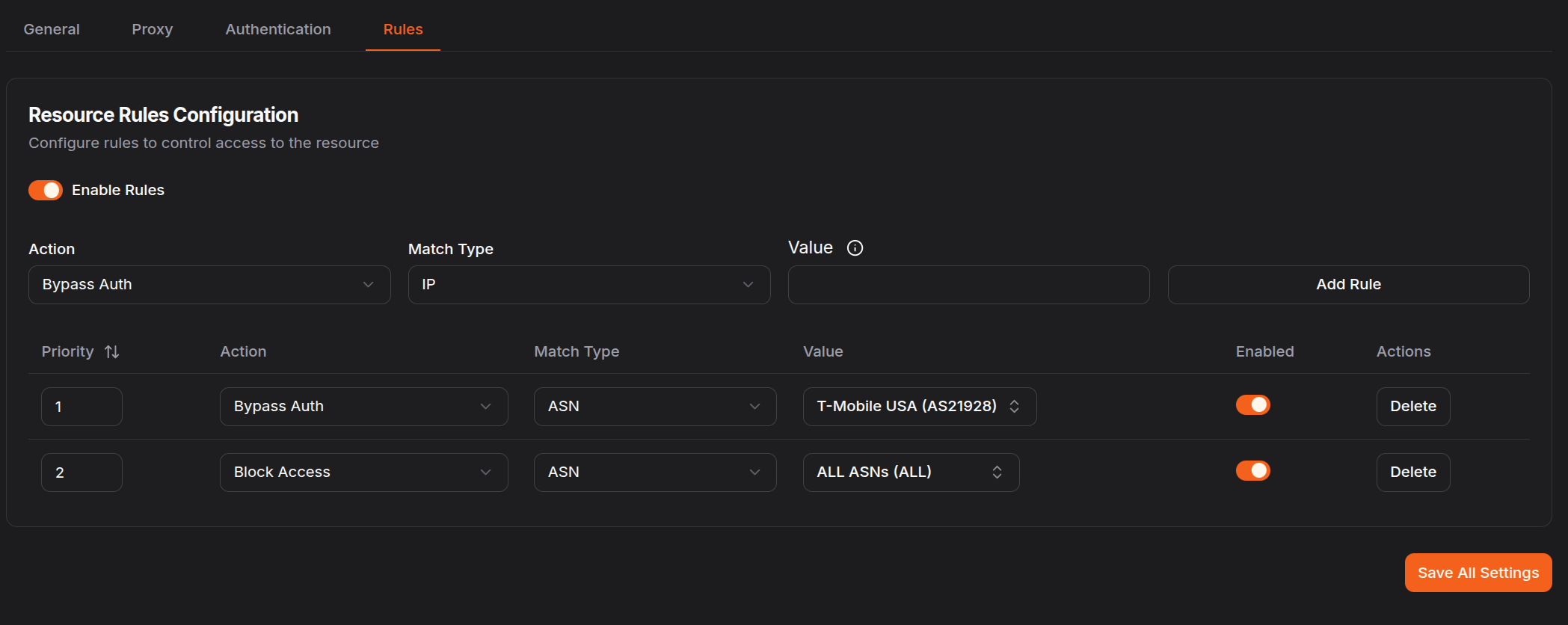
Setting Up ASN Blocking Rules
- Navigate to your target resource and select the Rules tab
- Create a new rule and select ASN as the match type
- Choose an ASN from the dropdown of common providers, or manually enter a specific ASN number
- Choose your rule action:
- Allow: Bypass authentication for users from specific ASNs
- Deny: Block all access from specific ASNs
- Pass to Auth: Let users from specific ASNs proceed to authentication
Common ASNs
The dropdown includes many commonly-used ASNs such as:
- Cloud Providers: Amazon (AS16509), Google Cloud (AS15169), Microsoft Azure (AS8075), DigitalOcean (AS14061)
- Major ISPs: Comcast (AS7922), AT&T (AS7018), Verizon (AS701), Deutsche Telekom (AS3320)
- VPN/Proxy Services: NordVPN (various), ExpressVPN (various), Mullvad (AS42831)
- CDN Providers: Cloudflare (AS13335), Fastly (AS54113), Akamai (various)
If the ASN you need isn't in the dropdown, you can manually enter the ASN number (e.g., AS12345 or just 12345).
Common ASN Blocking Patterns
Block VPN and Proxy Services
Create deny rules for known VPN and proxy ASNs to prevent anonymous access:
- Create Deny rules for each VPN/proxy provider ASN
- Select ASNs from the dropdown or enter them manually
- Set appropriate priorities
Block Datacenter Traffic
Block access from datacenter and hosting provider ASNs while allowing residential users:
- Create Deny rules for major cloud and hosting provider ASNs
- Include providers like AWS, GCP, Azure, DigitalOcean, etc.
- This helps ensure only real users from residential ISPs can access your resources
Allow Only Specific Networks
Create a default deny rule and explicitly allow only approved ASNs:
- Create a Deny rule matching all traffic with priority 100
- Create Allow rules for specific approved ASNs with higher priority (e.g., 10, 20, 30)
Regional ISP Control
Allow access only from specific country ISPs while blocking others:
- Combine with Country Rules: Use ASN rules to specify which ISPs are allowed
- Create Allow rules for major residential ISPs in your target countries
- Block datacenter and VPN ASNs that might circumvent country restrictions
Best Practices
ASN blocking affects all users from that network. Be careful when blocking large ISPs or cloud providers, as legitimate users or your own infrastructure may be affected.
Finding ASN Numbers
If you need to find the ASN for a specific network or provider:
- Use online tools like bgp.he.net or ipinfo.io
- Search by company name, IP address, or ASN number
- Enter the ASN in the rule configuration (with or without the "AS" prefix)
Rule Priority Example
Priority 1: Allow - ASN: AS7922 (Comcast)
Priority 2: Allow - ASN: AS7018 (AT&T)
Priority 3: Deny - ASN: AS13335 (Cloudflare - VPN)
Priority 4: Deny - ASN: AS16509 (Amazon - Datacenter)
This configuration allows access from residential users on Comcast and AT&T while blocking Cloudflare's VPN service and Amazon datacenters.
Advanced Patterns
Block Bot Networks
Identify and block ASNs associated with automated bot traffic:
- Monitor your access logs for suspicious ASNs
- Create Deny rules for ASNs showing bot-like behavior
- Regularly review and update your blocklist
Was this page helpful?