

Geo-blocking is available in Pangolin Community Edition. It depends on Pangolin’s geo-location database, which is also used by other location-aware features such as analytics. Follow Enable Geo-location before creating country or region rules.
Benefits of Geo-blocking
Geo-blocking provides several important security and compliance advantages:Security Benefits
- Reduce Attack Surface: Block access from regions with high levels of malicious activity or where you don’t expect legitimate users
- Prevent Unauthorized Access: Limit exposure to threat actors operating from specific geographic locations
- Compliance Requirements: Meet regulatory requirements that restrict data access based on geographic location
- Resource Protection: Prevent unnecessary load on your services from regions where you don’t operate
Implementing Geo-blocking with Bypass Rules
Geo-blocking in Pangolin is implemented using bypass rules with country-based matching. You can create rules that either allow or deny access based on the visitor’s country. To apply the same geo-blocking rules to multiple public resources, define them in a resource policy and attach that policy to each resource.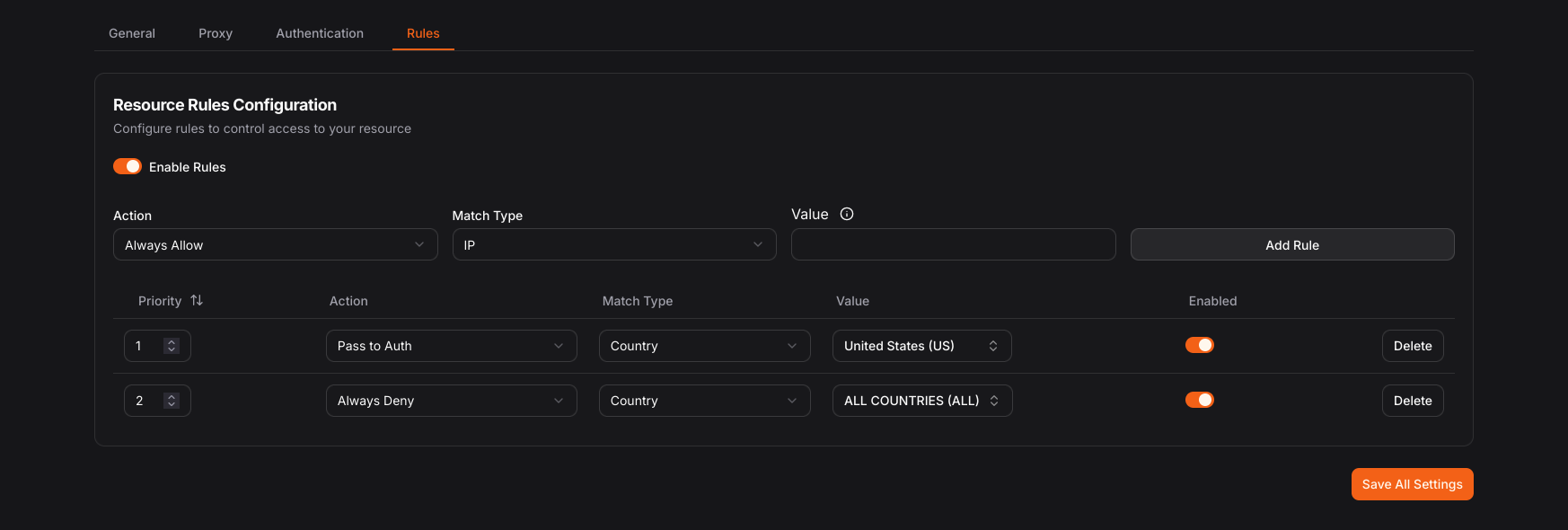
Screenshot of resources rules from the Pangolin Dashboard.
Setting Up Geo-blocking Rules
- Navigate to your target resource and select the Rules tab
- Create a new rule and select Country as the match type
- Choose your rule action:
- Allow: Bypass authentication for users from specific countries
- Deny: Block all access from specific countries
- Pass to Auth: Let users from specific countries proceed to authentication
Common Geo-blocking Patterns
Allow Only Specific Countries
Create a “Deny” rule that blocks all countries except those you want to allow:- Create a Deny rule
- Select Country match type
- Choose “ALL” to match all countries
- Add priority: 100 (lower priority)
- Create Allow rules for each approved country
- Set higher priority (e.g., 10, 20, 30) so they process first
Block Specific High-Risk Countries
Create targeted deny rules for specific countries while allowing all others:- Create Deny rules for each country you want to block
- Select the specific countries from the dropdown
- Set appropriate priorities
Regional Access Control
Combine geo-blocking with other rule types for sophisticated access control:- Path + Country: Block admin paths (
/admin/*) from all countries except your headquarters - IP + Country: Allow specific IPs from restricted countries (for VPN users or partners)
- CIDR + Country: Combine network-based and geography-based restrictions