

Amazon S3
Archive audit logs to S3 or S3-compatible object storage
S3 destinations upload batches of your organization's audit logs as objects in a bucket you control. Use them for long-term archival, data lakes (Athena, Glue, BigQuery), or S3-compatible stores such as MinIO and Cloudflare R2.
Event streaming is only available in Pangolin Cloud or self-hosted Enterprise Edition.
Overview
An S3 destination writes one object per batch via PutObject. Each object contains up to 250 events of a single log type. There is no custom body template or field mapping; Pangolin serializes every event in a fixed shape and chooses the object key automatically.
Configure:
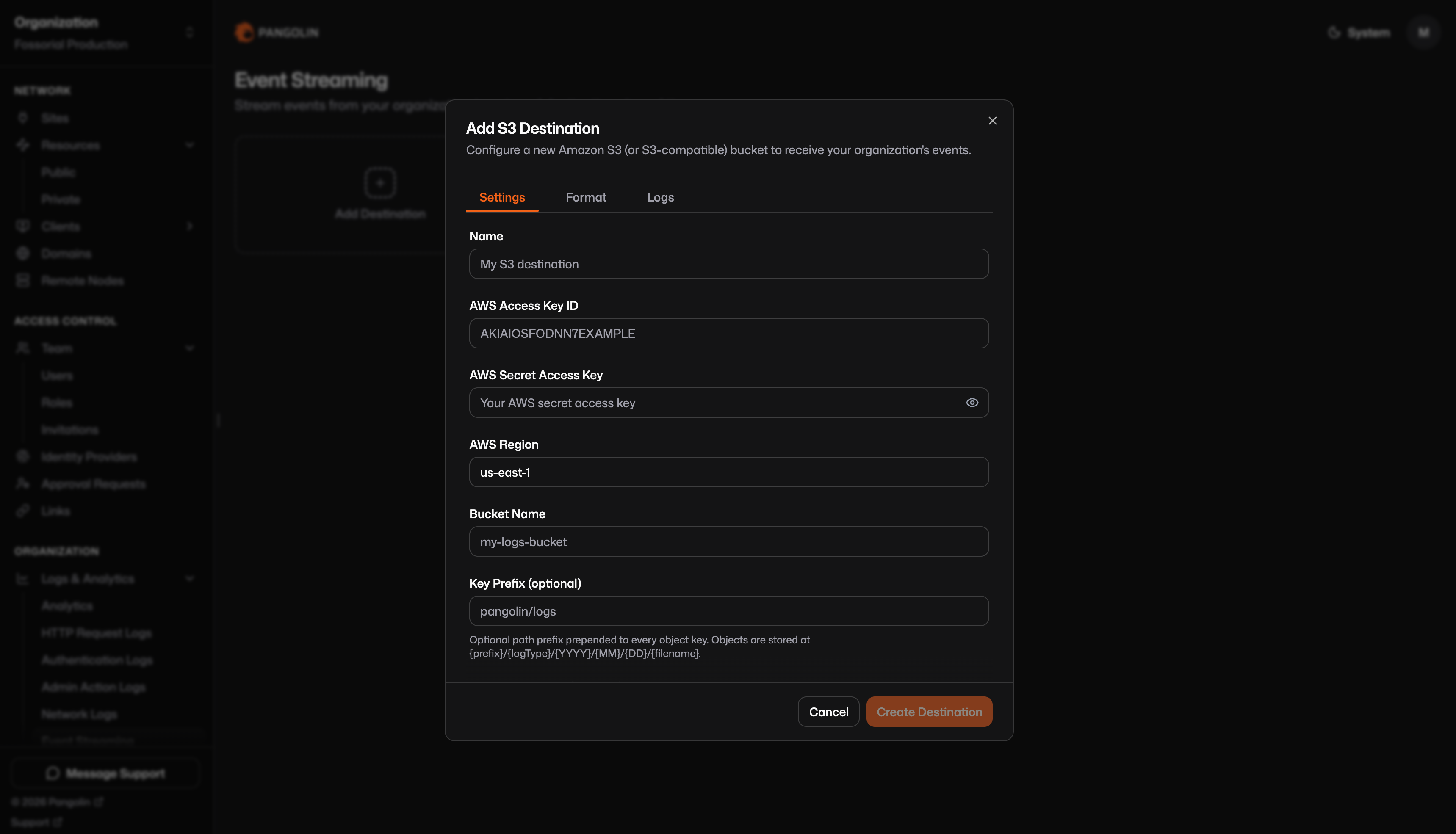
- Settings: Name, credentials, region, bucket, optional prefix and custom endpoint.
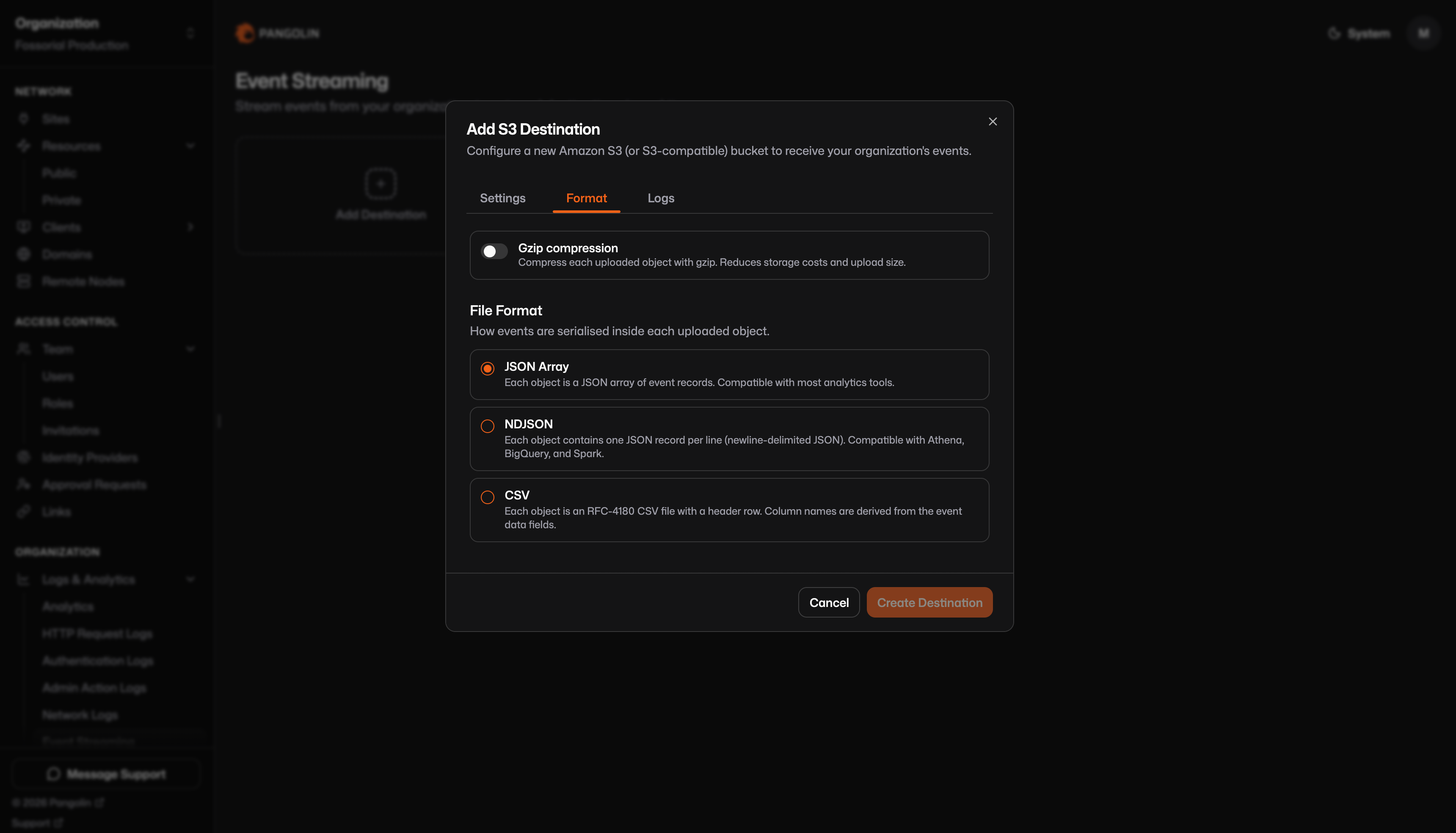
- Format: File format (JSON array, NDJSON, or CSV) and optional gzip compression.
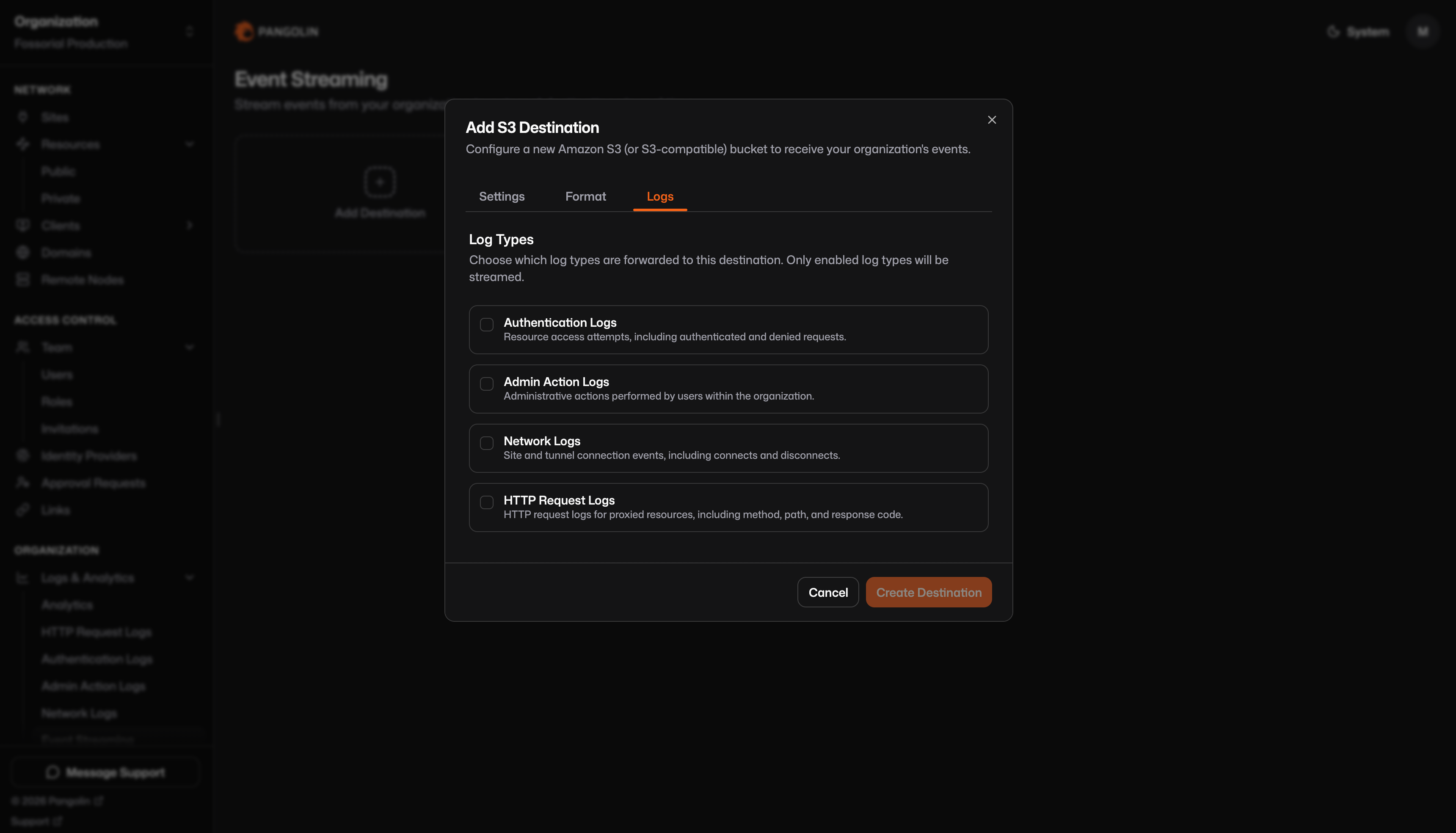
- Logs: Which log types are forwarded.
Settings tab
| Field | Required | Description |
|---|---|---|
| Name | Yes | Display label for this destination |
| AWS Access Key ID | Yes | Static access key for the S3 client |
| AWS Secret Access Key | Yes | Secret for the access key |
| AWS Region | Yes | S3 client region (UI default: us-east-1) |
| Bucket name | Yes | Target bucket |
| Key prefix | No | Prepended to every object key; trailing slashes are stripped |
| Custom endpoint | No | Base URL for MinIO, R2, etc.; leave blank for AWS S3 |
Pangolin uses static access keys only. There is no IAM role, instance profile, or OIDC picker in the UI.
Uploads time out after 60 seconds per object.
Format tab
Gzip compression (optional): When enabled, the object body is gzip-compressed before upload, Content-Encoding: gzip is set, and the object key gets a .gz suffix (for example ….json.gz). Decompress before parsing unless your tool handles gzip automatically.
File format:
| Format | Description |
|---|---|
| JSON array (default) | One array per object: [{…}, {…}, …] |
| NDJSON | One JSON object per line, no outer array |
| CSV | RFC-4180 CSV with a header row; see CSV format |
Logs tab
Choose which log categories are uploaded. Each enabled type is written to its own key prefix (request/, action/, etc.). Only log types enabled for your organization can be streamed.
Object key layout
Every upload gets a unique key:
{prefix}/{logType}/{YYYY}/{MM}/{DD}/{HH-mm-ss-uuid}.{ext}[.gz]| Segment | Meaning |
|---|---|
prefix | Your optional key prefix; omitted when empty |
logType | request, action, access, or connection |
YYYY/MM/DD | Upload time (UTC), not the event timestamp |
HH-mm-ss-uuid | Upload time plus a UUID so keys never collide |
ext | json (JSON array), ndjson, or csv |
.gz | Present when gzip is enabled |
Without prefix:
request/2026/06/04/14-30-45-a1b2c3d4-e5f6-7890-abcd-ef1234567890.jsonWith prefix pangolin/audit and gzip:
pangolin/audit/action/2026/06/04/14-30-45-a1b2c3d4-e5f6-7890-abcd-ef1234567890.json.gzEnabling multiple log types on one destination produces separate object streams under different logType/ segments. A single object never mixes log types.
Event record shape
Each event in JSON and NDJSON objects uses this fixed structure:
{
  "event": "request",
  "timestamp": "2026-06-04T12:00:00.000Z",
  "data": {
    "timestamp": 1717492800,
    "action": true,
    "method": "GET",
    "path": "/api/health"
  }
}| Field | Meaning |
|---|---|
event | Log type: request, access, action, or connection |
timestamp | Event time as ISO-8601 UTC (connection logs use session start) |
data | The complete stored log row for that record, not a curated subset |
Some columns are stored as JSON strings in the database (headers, query, and metadata on request logs, for example). In data, they appear as string values, not nested JSON objects. Parse them in your pipeline if you need structured fields.
File formats
JSON array (default)
- One S3 object per batch; body is
[{…}, {…}, …]. - Up to 250 events per object.
Content-Type: application/json.
NDJSON
- One S3 object per batch; body is one JSON record per line with no outer array.
- Good for Athena, BigQuery load jobs, Spark, and similar line-oriented pipelines.
Content-Type: application/x-ndjson.
CSV format
- Header row:
event,timestamp, then all field names found indataacross that batch (union of keys, in insertion order). - Each data row flattens
event,timestamp, and spreadsdatafields into columns. There is no nesteddatacolumn. - Missing fields in a given row leave an empty cell.
- Object or array values in
dataare written asJSON.stringifystrings inside the cell. Content-Type: text/csv; charset=utf-8.
The column set can grow as new fields appear in later batches. Order is not guaranteed to stay identical across all objects over time.
Batching and throughput
- Objects are written per batch (up to ~250 events), not one object per log line.
- Pangolin polls for new logs on a regular interval and may write multiple objects during catch-up after a pause.
- No backfill: New destinations start from the current log cursor. Historical logs already in Pangolin are not uploaded.
- Extended outage: If the destination is unreachable for about 24 hours, the backlog may be discarded and streaming resumes from the present cursor (same behavior as HTTP streaming).
Gzip
When gzip is enabled:
- The serialized body is compressed before upload.
- The object key includes
.gz(for example….ndjson.gz). - S3 stores
Content-Encoding: gzip.
Consumers must decompress before parsing unless the tool auto-detects gzip (many Athena and Spark setups do when Content-Encoding is set). NDJSON plus gzip is a common choice for cost-sensitive archival.
S3-compatible storage
Set Custom endpoint to your vendor's S3 API URL and provide access key credentials per that vendor's documentation.
| Store | Notes |
|---|---|
| AWS S3 | Leave custom endpoint blank; use a bucket in the configured region |
| MinIO | Set endpoint to your MinIO server URL; use MinIO access keys |
| Cloudflare R2 | Set endpoint to your R2 S3 API URL; use R2 access keys |
Pangolin does not expose path-style vs virtual-hosted addressing, ACLs, SSE-KMS, storage class, or multipart tuning. Configure those in the vendor console or bucket policy.
IAM and bucket policy
Grant the access key permission to write under your prefix. A minimal AWS example:
{
  "Version": "2012-10-17",
  "Statement": [
    {
      "Effect": "Allow",
      "Action": ["s3:PutObject"],
      "Resource": "arn:aws:s3:::your-bucket/pangolin/audit/*"
    },
    {
      "Effect": "Allow",
      "Action": ["s3:ListBucket"],
      "Resource": "arn:aws:s3:::your-bucket",
      "Condition": {
        "StringLike": { "s3:prefix": ["pangolin/audit/*"] }
      }
    }
  ]
}
Adjust bucket name and prefix to match your configuration. ListBucket is optional but useful when debugging missing objects.
Block public access, encryption at rest, lifecycle rules, and object tags are configured in AWS or your vendor console, not in Pangolin.
Log type reference
The data object in each streamed event is the full stored log row. Field sets differ by log type. See the documentation for that log type under Logs & Analytics for the complete data shape.
Limitations and troubleshooting
- No custom JSON shape: Fixed event record only. Use an HTTP destination if you need body templates or field remapping.
- No per-event objects: Always batched (up to ~250 events per object).
- No mixed log types in one object: Each upload contains a single log type.
- Upload-time partitioning: Key date folders use upload time (UTC), not the event's
timestamp. - CSV columns: Automatic from batch contents; not user-selectable; column set may change over time.
- Static credentials only: Rotate keys by updating the destination; credentials are stored encrypted server-side.
- Historical logs: New destinations do not backfill.
- Delivery errors: Check the destination's last error in the dashboard. Common causes:
AccessDenied, wrong bucket or region, bad endpoint URL, TLS issues, or expired credentials. - Missing objects: Confirm prefix, lifecycle rules, and that the log type is enabled on the Logs tab.
- Athena/Glue parse errors: Verify format (JSON array vs NDJSON), gzip handling, and that the crawler/table schema matches flattened CSV columns if using CSV.
Was this page helpful?